Terraform Multi-Layer Architecture: Bootstrap, Foundation, Platform, Application
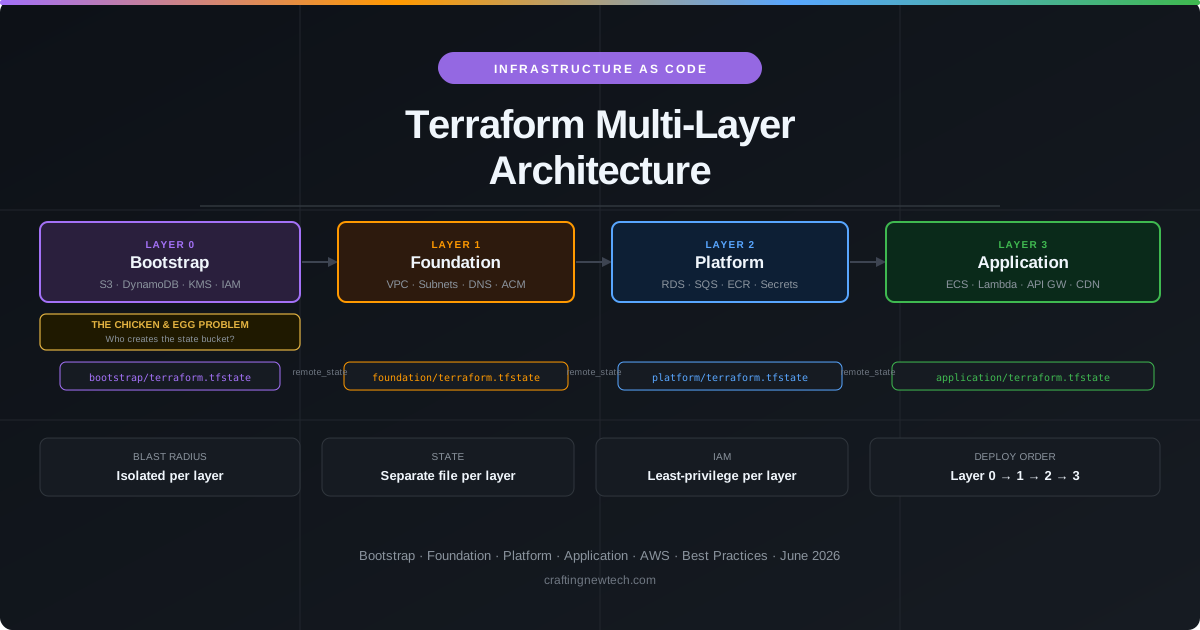
One of the most common mistakes in Terraform projects is putting everything into a single state file. A monolithic state works fine at the start — until a botched terraform apply on the application layer accidentally destroys the VPC, taking down every environment at once. Or a developer who only needs to deploy a Lambda function gets blocked because someone else is applying a database change and the state file is locked.
Multi-layer architecture solves this by splitting infrastructure into independent stacks with clear ownership boundaries. Each layer has its own state file, its own IAM role, and its own deployment cadence. Changes to the application layer never touch the networking layer. A mistake in the platform layer cannot accidentally terminate EC2 instances in the application layer.
This article walks through a four-layer model — Bootstrap, Foundation, Platform, Application — explains the chicken-and-egg bootstrapping problem that trips up almost every new Terraform project, and provides the patterns and code to implement it correctly from the start.
The Chicken and the Egg Problem
Every Terraform best-practice guide says to store state remotely — in an S3 bucket with a DynamoDB table for locking. This is correct. But it creates an immediate contradiction:
You need Terraform to create the S3 bucket. But you need the S3 bucket to store Terraform’s state.
This is the bootstrap problem, and it has exactly one clean solution: start with local state, create the bucket, then migrate.
The wrong approaches:
- Create the bucket manually in the console — now you have unmanaged infrastructure that Terraform does not know about, and you will eventually drift.
- Import the manually-created bucket — better, but still fragile if the import step is not documented.
- Use
terraform applywith local backend forever — state lives on a developer’s laptop. One disk wipe and you lose all state.
The right approach:
# bootstrap/backend.tf — start with local state
terraform {
  backend "local" {
    path = "terraform.tfstate"
  }
}
Apply the bootstrap layer once with local state to create the S3 bucket, DynamoDB table, and KMS key. Then migrate:
# After initial apply, migrate to the S3 backend
terraform init -migrate-state
Update backend.tf to point to the newly created bucket:
# bootstrap/backend.tf — after migration
terraform {
  backend "s3" {
    bucket         = "my-project-terraform-state"
    key            = "bootstrap/terraform.tfstate"
    region         = "us-east-1"
    encrypt        = true
    kms_key_id     = "arn:aws:kms:us-east-1:ACCOUNT_ID:key/KEY_ID"
    dynamodb_table = "my-project-terraform-locks"
  }
}
From this point forward, all four layers store their state in S3. The bootstrap layer is applied rarely — only when the foundational state infrastructure itself needs to change.
The Four-Layer Model
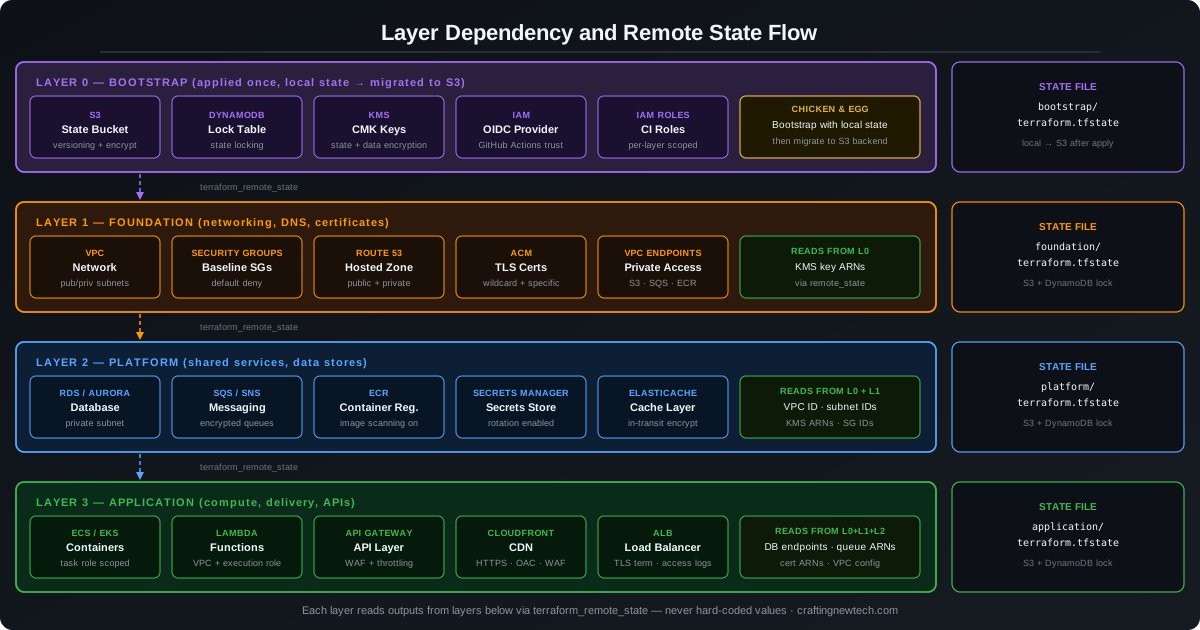
Each layer builds on the one below it. The dependency is one-directional — a layer can read outputs from layers below it, but never from layers above it. This constraint is what keeps the architecture clean.
Layer 3 — Application   (deploys frequently — every release)
    ↑ reads from
Layer 2 — Platform      (deploys occasionally — shared services)
    ↑ reads from
Layer 1 — Foundation    (deploys rarely — networking)
    ↑ reads from
Layer 0 — Bootstrap     (deployed once — state infrastructure)
Directory Structure
terraform/
├── bootstrap/          # Layer 0
│   ├── main.tf
│   ├── s3.tf
│   ├── dynamodb.tf
│   ├── kms.tf
│   ├── iam.tf
│   ├── outputs.tf
│   └── backend.tf
│
├── foundation/         # Layer 1
│   ├── main.tf
│   ├── vpc.tf
│   ├── dns.tf
│   ├── acm.tf
│   ├── outputs.tf
│   └── backend.tf
│
├── platform/           # Layer 2
│   ├── main.tf
│   ├── rds.tf
│   ├── sqs.tf
│   ├── ecr.tf
│   ├── secrets.tf
│   ├── outputs.tf
│   └── backend.tf
│
└── application/        # Layer 3
    ├── main.tf
    ├── ecs.tf
    ├── lambda.tf
    ├── api_gateway.tf
    ├── cloudfront.tf
    ├── outputs.tf
    └── backend.tf
Each layer is a completely independent Terraform root module. You cd into it and run terraform init, terraform plan, terraform apply independently.
Layer 0 — Bootstrap
The bootstrap layer creates the infrastructure that all other layers depend on for their own state management. It is applied once and rarely touched.
bootstrap/s3.tf — State Bucket
# bootstrap/s3.tf
resource "aws_s3_bucket" "state" {
  bucket = "${var.project_name}-terraform-state"
}

resource "aws_s3_bucket_versioning" "state" {
  bucket = aws_s3_bucket.state.id
  versioning_configuration {
    status = "Enabled"
  }
}

resource "aws_s3_bucket_server_side_encryption_configuration" "state" {
  bucket = aws_s3_bucket.state.id
  rule {
    apply_server_side_encryption_by_default {
      sse_algorithm     = "aws:kms"
      kms_master_key_id = aws_kms_key.state.arn
    }
    bucket_key_enabled = true
  }
}

resource "aws_s3_bucket_public_access_block" "state" {
  bucket                  = aws_s3_bucket.state.id
  block_public_acls       = true
  block_public_policy     = true
  ignore_public_acls      = true
  restrict_public_buckets = true
}

resource "aws_s3_bucket_policy" "state" {
  bucket = aws_s3_bucket.state.id
  policy = jsonencode({
    Version = "2012-10-17"
    Statement = [
      {
        Sid       = "DenyHTTP"
        Effect    = "Deny"
        Principal = "*"
        Action    = "s3:*"
        Resource  = ["${aws_s3_bucket.state.arn}/*", aws_s3_bucket.state.arn]
        Condition = {
          Bool = { "aws:SecureTransport" = "false" }
        }
      }
    ]
  })
}
bootstrap/dynamodb.tf — Lock Table
# bootstrap/dynamodb.tf
resource "aws_dynamodb_table" "locks" {
  name         = "${var.project_name}-terraform-locks"
  billing_mode = "PAY_PER_REQUEST"
  hash_key     = "LockID"

  attribute {
    name = "LockID"
    type = "S"
  }

  server_side_encryption {
    enabled     = true
    kms_key_arn = aws_kms_key.state.arn
  }

  point_in_time_recovery {
    enabled = true
  }
}
bootstrap/kms.tf — KMS Encryption Key
# bootstrap/kms.tf
resource "aws_kms_key" "state" {
  description             = "KMS key for Terraform state encryption"
  deletion_window_in_days = 30
  enable_key_rotation     = true

  policy = jsonencode({
    Version = "2012-10-17"
    Statement = [
      {
        Sid       = "Enable IAM User Permissions"
        Effect    = "Allow"
        Principal = { AWS = "arn:aws:iam::${var.account_id}:root" }
        Action    = "kms:*"
        Resource  = "*"
      }
    ]
  })
}

resource "aws_kms_alias" "state" {
  name          = "alias/${var.project_name}-terraform-state"
  target_key_id = aws_kms_key.state.key_id
}
bootstrap/iam.tf — OIDC Provider & CI Roles
# bootstrap/iam.tf — OIDC provider for GitHub Actions (no static keys)
resource "aws_iam_openid_connect_provider" "github" {
  url             = "https://token.actions.githubusercontent.com"
  client_id_list  = ["sts.amazonaws.com"]
  thumbprint_list = ["6938fd4d98bab03faadb97b34396831e3780aea1"]
}

resource "aws_iam_role" "foundation_ci" {
  name = "${var.project_name}-foundation-ci"
  assume_role_policy = jsonencode({
    Version = "2012-10-17"
    Statement = [{
      Effect = "Allow"
      Principal = { Federated = aws_iam_openid_connect_provider.github.arn }
      Action = "sts:AssumeRoleWithWebIdentity"
      Condition = {
        StringLike = {
          "token.actions.githubusercontent.com:sub" = "repo:${var.github_org}/${var.github_repo}:*"
        }
      }
    }]
  })
}
bootstrap/outputs.tf — Layer Outputs
# bootstrap/outputs.tf
output "state_bucket_name" {
  value = aws_s3_bucket.state.id
}

output "state_lock_table" {
  value = aws_dynamodb_table.locks.name
}

output "kms_key_arn" {
  value     = aws_kms_key.state.arn
  sensitive = true
}

output "oidc_provider_arn" {
  value = aws_iam_openid_connect_provider.github.arn
}
Layer 1 — Foundation
The foundation layer creates the network infrastructure that everything else sits inside. It reads the KMS key ARN from Layer 0 via terraform_remote_state.
foundation/main.tf — Remote State Reference
# foundation/main.tf — remote state reference
data "terraform_remote_state" "bootstrap" {
  backend = "s3"
  config = {
    bucket = var.state_bucket
    key    = "bootstrap/terraform.tfstate"
    region = var.aws_region
  }
}
foundation/vpc.tf — VPC & Endpoints
# foundation/vpc.tf
module "vpc" {
  source  = "terraform-aws-modules/vpc/aws"
  version = "~> 5.0"

  name = "${var.project_name}-vpc"
  cidr = var.vpc_cidr

  azs             = ["${var.aws_region}a", "${var.aws_region}b", "${var.aws_region}c"]
  private_subnets = var.private_subnet_cidrs
  public_subnets  = var.public_subnet_cidrs

  enable_nat_gateway     = true
  single_nat_gateway     = false   # HA: one per AZ
  enable_dns_hostnames   = true
  enable_dns_support     = true

  # VPC Flow Logs to S3
  enable_flow_log                      = true
  create_flow_log_cloudwatch_iam_role  = false
  flow_log_destination_type            = "s3"
  flow_log_destination_arn             = aws_s3_bucket.flow_logs.arn

  tags = local.common_tags
}

# VPC Endpoints — keep traffic inside AWS network
resource "aws_vpc_endpoint" "s3" {
  vpc_id            = module.vpc.vpc_id
  service_name      = "com.amazonaws.${var.aws_region}.s3"
  vpc_endpoint_type = "Gateway"
  route_table_ids   = module.vpc.private_route_table_ids
}

resource "aws_vpc_endpoint" "ecr_dkr" {
  vpc_id              = module.vpc.vpc_id
  service_name        = "com.amazonaws.${var.aws_region}.ecr.dkr"
  vpc_endpoint_type   = "Interface"
  subnet_ids          = module.vpc.private_subnets
  security_group_ids  = [aws_security_group.vpc_endpoints.id]
  private_dns_enabled = true
}
foundation/outputs.tf — Layer Outputs
# foundation/outputs.tf
output "vpc_id" {
  value = module.vpc.vpc_id
}

output "private_subnet_ids" {
  value = module.vpc.private_subnets
}

output "public_subnet_ids" {
  value = module.vpc.public_subnets
}

output "certificate_arn" {
  value = aws_acm_certificate.main.arn
}
Layer 2 — Platform
The platform layer creates shared services. It reads VPC outputs from Layer 1 and KMS outputs from Layer 0.
platform/main.tf — Remote State References
# platform/main.tf — reads from both lower layers
data "terraform_remote_state" "bootstrap" {
  backend = "s3"
  config = {
    bucket = var.state_bucket
    key    = "bootstrap/terraform.tfstate"
    region = var.aws_region
  }
}

data "terraform_remote_state" "foundation" {
  backend = "s3"
  config = {
    bucket = var.state_bucket
    key    = "foundation/terraform.tfstate"
    region = var.aws_region
  }
}

locals {
  vpc_id             = data.terraform_remote_state.foundation.outputs.vpc_id
  private_subnet_ids = data.terraform_remote_state.foundation.outputs.private_subnet_ids
  kms_key_arn        = data.terraform_remote_state.bootstrap.outputs.kms_key_arn
}
platform/rds.tf — RDS Database
# platform/rds.tf
resource "aws_db_instance" "main" {
  identifier        = "${var.project_name}-db"
  engine            = "postgres"
  engine_version    = "16.2"
  instance_class    = var.db_instance_class
  allocated_storage = 20
  storage_type      = "gp3"

  db_name  = var.db_name
  username = var.db_username
  # No password argument — use IAM authentication instead
  iam_database_authentication_enabled = true

  # Security
  storage_encrypted   = true
  kms_key_id          = local.kms_key_arn
  deletion_protection = true
  skip_final_snapshot = false
  final_snapshot_identifier = "${var.project_name}-db-final"

  # Network — private only
  db_subnet_group_name   = aws_db_subnet_group.main.name
  vpc_security_group_ids = [aws_security_group.rds.id]
  publicly_accessible    = false

  # Monitoring
  monitoring_interval             = 60
  monitoring_role_arn             = aws_iam_role.rds_monitoring.arn
  performance_insights_enabled    = true
  performance_insights_kms_key_id = local.kms_key_arn
  enabled_cloudwatch_logs_exports = ["postgresql", "upgrade"]

  backup_retention_period = 7
  backup_window           = "03:00-04:00"
  maintenance_window      = "sun:04:00-sun:05:00"

  tags = local.common_tags
}

resource "aws_security_group" "rds" {
  name   = "${var.project_name}-rds"
  vpc_id = local.vpc_id

  # Only allow access from app security group — no 0.0.0.0/0
  ingress {
    from_port       = 5432
    to_port         = 5432
    protocol        = "tcp"
    security_groups = [aws_security_group.app.id]
    description     = "PostgreSQL from application layer"
  }

  egress {
    from_port   = 0
    to_port     = 0
    protocol    = "-1"
    cidr_blocks = ["0.0.0.0/0"]
    description = "Allow all outbound"
  }
}
platform/sqs.tf — SQS Queue & DLQ
# platform/sqs.tf
resource "aws_sqs_queue" "main" {
  name                       = "${var.project_name}-queue"
  message_retention_seconds  = 86400
  visibility_timeout_seconds = 300
  kms_master_key_id          = local.kms_key_arn

  redrive_policy = jsonencode({
    deadLetterTargetArn = aws_sqs_queue.dlq.arn
    maxReceiveCount     = 3
  })
}

resource "aws_sqs_queue" "dlq" {
  name              = "${var.project_name}-dlq"
  kms_master_key_id = local.kms_key_arn

  # Alert on DLQ messages
}

resource "aws_cloudwatch_metric_alarm" "dlq_messages" {
  alarm_name          = "${var.project_name}-dlq-not-empty"
  comparison_operator = "GreaterThanThreshold"
  evaluation_periods  = 1
  metric_name         = "ApproximateNumberOfMessagesVisible"
  namespace           = "AWS/SQS"
  period              = 60
  statistic           = "Sum"
  threshold           = 0
  alarm_actions       = [var.ops_sns_topic_arn]

  dimensions = {
    QueueName = aws_sqs_queue.dlq.name
  }
}
Layer 3 — Application
The application layer is deployed most frequently — on every release. It reads from all three layers below it.
application/main.tf — Remote State References
# application/main.tf
data "terraform_remote_state" "bootstrap" {
  backend = "s3"
  config  = { bucket = var.state_bucket, key = "bootstrap/terraform.tfstate", region = var.aws_region }
}

data "terraform_remote_state" "foundation" {
  backend = "s3"
  config  = { bucket = var.state_bucket, key = "foundation/terraform.tfstate", region = var.aws_region }
}

data "terraform_remote_state" "platform" {
  backend = "s3"
  config  = { bucket = var.state_bucket, key = "platform/terraform.tfstate", region = var.aws_region }
}

locals {
  vpc_id             = data.terraform_remote_state.foundation.outputs.vpc_id
  private_subnet_ids = data.terraform_remote_state.foundation.outputs.private_subnet_ids
  certificate_arn    = data.terraform_remote_state.foundation.outputs.certificate_arn
  db_endpoint        = data.terraform_remote_state.platform.outputs.db_endpoint
  queue_url          = data.terraform_remote_state.platform.outputs.queue_url
  kms_key_arn        = data.terraform_remote_state.bootstrap.outputs.kms_key_arn
}
application/lambda.tf — Lambda Function & IAM
# application/lambda.tf
resource "aws_lambda_function" "api" {
  function_name = "${var.project_name}-api"
  role          = aws_iam_role.lambda_exec.arn
  handler       = "index.handler"
  runtime       = "nodejs22.x"
  filename      = data.archive_file.lambda.output_path

  # VPC configuration — Lambda in private subnets
  vpc_config {
    subnet_ids         = local.private_subnet_ids
    security_group_ids = [aws_security_group.lambda.id]
  }

  # No secrets in environment variables — use Secrets Manager
  environment {
    variables = {
      DB_SECRET_ARN = var.db_secret_arn   # ARN only, not the secret value
      QUEUE_URL     = local.queue_url
      REGION        = var.aws_region
    }
  }

  # Encrypt environment variables
  kms_key_arn = local.kms_key_arn

  tracing_config {
    mode = "Active"
  }

  tags = local.common_tags
}

resource "aws_iam_role" "lambda_exec" {
  name = "${var.project_name}-lambda-exec"
  assume_role_policy = jsonencode({
    Version = "2012-10-17"
    Statement = [{
      Effect    = "Allow"
      Principal = { Service = "lambda.amazonaws.com" }
      Action    = "sts:AssumeRole"
    }]
  })
}

resource "aws_iam_role_policy" "lambda_exec" {
  name = "${var.project_name}-lambda-exec"
  role = aws_iam_role.lambda_exec.id
  policy = jsonencode({
    Version = "2012-10-17"
    Statement = [
      # Least privilege — only what this Lambda actually needs
      {
        Effect   = "Allow"
        Action   = ["secretsmanager:GetSecretValue"]
        Resource = [var.db_secret_arn]
      },
      {
        Effect   = "Allow"
        Action   = ["sqs:SendMessage", "sqs:ReceiveMessage", "sqs:DeleteMessage"]
        Resource = [local.queue_arn]
      },
      {
        Effect   = "Allow"
        Action   = ["kms:Decrypt", "kms:GenerateDataKey"]
        Resource = [local.kms_key_arn]
      },
      # VPC networking
      {
        Effect   = "Allow"
        Action   = ["ec2:CreateNetworkInterface", "ec2:DescribeNetworkInterfaces", "ec2:DeleteNetworkInterface"]
        Resource = ["*"]
      }
    ]
  })
}
application/cloudfront.tf — CloudFront Distribution
# application/cloudfront.tf
resource "aws_cloudfront_distribution" "main" {
  origin {
    domain_name              = aws_lb.main.dns_name
    origin_id                = "alb"
    custom_origin_config {
      http_port              = 80
      https_port             = 443
      origin_protocol_policy = "https-only"
      origin_ssl_protocols   = ["TLSv1.2"]
    }
  }

  enabled         = true
  is_ipv6_enabled = true
  aliases         = [var.domain_name]

  default_cache_behavior {
    allowed_methods        = ["DELETE", "GET", "HEAD", "OPTIONS", "PATCH", "POST", "PUT"]
    cached_methods         = ["GET", "HEAD"]
    target_origin_id       = "alb"
    viewer_protocol_policy = "redirect-to-https"

    forwarded_values {
      query_string = true
      cookies { forward = "none" }
    }
  }

  restrictions {
    geo_restriction { restriction_type = "none" }
  }

  viewer_certificate {
    acm_certificate_arn      = local.certificate_arn
    ssl_support_method       = "sni-only"
    minimum_protocol_version = "TLSv1.2_2021"
  }

  web_acl_id = aws_wafv2_web_acl.main.arn

  logging_config {
    bucket          = "${var.logs_bucket}.s3.amazonaws.com"
    prefix          = "cloudfront/"
    include_cookies = false
  }
}
Connecting Layers: The Remote State Pattern
The terraform_remote_state data source is the glue between layers. It reads the outputs of a lower layer’s state file from S3.
Rule: never hardcode values between layers. If Layer 2 needs the VPC ID, it reads it from Layer 1’s state — it does not have the VPC ID string pasted into a .tfvars file.
# Always reference layer outputs, never hardcode
# WRONG:
vpc_id = "vpc-0abc123def456"   # hardcoded — will drift

# RIGHT:
vpc_id = data.terraform_remote_state.foundation.outputs.vpc_id
Mark sensitive outputs explicitly:
# Any output that contains credentials, keys, or ARNs that reveal account structure
output "db_endpoint" {
  value     = aws_db_instance.main.endpoint
  sensitive = true   # hidden in plan output, not stored in plain text in logs
}

output "kms_key_arn" {
  value     = aws_kms_key.state.arn
  sensitive = true
}
Security Best Practices
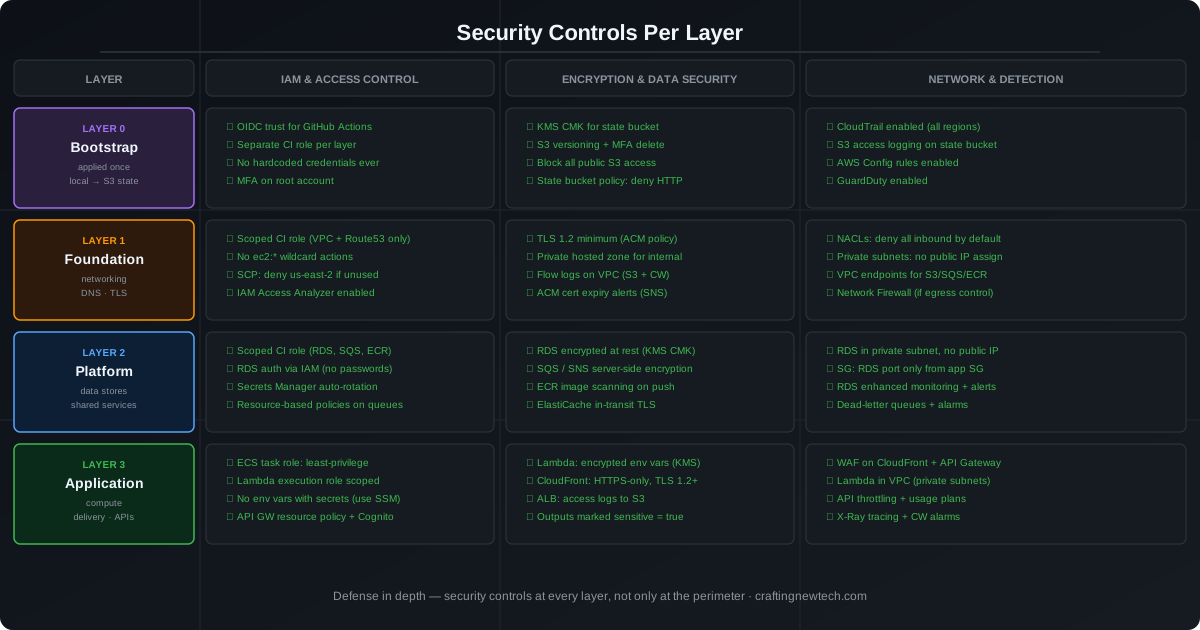
Enforce Least-Privilege IAM Per Layer
Each layer gets its own CI/CD IAM role scoped to only what that layer manages. The application layer role cannot touch VPC resources. The foundation layer role cannot touch databases.
# A foundation CI role that can ONLY manage VPC, Route53, and ACM
resource "aws_iam_role_policy" "foundation_ci" {
  name = "foundation-ci-policy"
  role = aws_iam_role.foundation_ci.id
  policy = jsonencode({
    Version = "2012-10-17"
    Statement = [
      {
        Effect = "Allow"
        Action = ["ec2:*Vpc*", "ec2:*Subnet*", "ec2:*RouteTable*",
                  "ec2:*SecurityGroup*", "ec2:*NetworkAcl*",
                  "ec2:*InternetGateway*", "ec2:*NatGateway*"]
        Resource = "*"
        Condition = {
          StringEquals = { "aws:RequestedRegion" = var.aws_region }
        }
      },
      {
        Effect   = "Allow"
        Action   = ["route53:*", "acm:*"]
        Resource = "*"
      }
      # Notably absent: rds:*, ecs:*, lambda:*, s3:* (general)
    ]
  })
}
Lock Provider and Module Versions
# versions.tf — pin everything
terraform {
  required_version = ">= 1.9.0, < 2.0.0"

  required_providers {
    aws = {
      source  = "hashicorp/aws"
      version = "~> 5.50"
    }
  }
}
Always run terraform init -upgrade in a controlled environment and review the diff in .terraform.lock.hcl before merging provider upgrades.
Tag Everything
# common/locals.tf — shared across all layers
locals {
  common_tags = {
    Project     = var.project_name
    Environment = var.environment
    Layer       = var.layer          # "bootstrap" | "foundation" | "platform" | "application"
    ManagedBy   = "terraform"
    Repository  = var.github_repo
  }
}
Tags enable cost allocation per layer, security policy enforcement via SCPs, and automated compliance checks.
Use Sensitive Variables for Secrets — Never .tfvars in Git
variable "db_password" {
  type      = string
  sensitive = true   # never printed in plan output
}
In CI/CD, pass sensitive values via environment variables (TF_VAR_db_password) sourced from a secrets manager — never committed to the repository.
Run tfsec Before Every Apply
# .github/workflows/terraform.yml
jobs:
  security:
    runs-on: ubuntu-latest
    steps:
      - uses: actions/checkout@v4
      - uses: aquasecurity/tfsec-action@v1.0.0
        with:
          working_directory: ./terraform/${{ matrix.layer }}
          additional_args: --minimum-severity HIGH

  apply:
    needs: security
    # ... rest of apply job
CI/CD Pipeline Per Layer
Each layer is deployed by its own GitHub Actions workflow, triggered when files in its directory change.
# .github/workflows/deploy-foundation.yml
name: Foundation

on:
  push:
    branches: [main]
    paths:
      - 'terraform/foundation/**'

jobs:
  security:
    uses: ./.github/workflows/tfsec.yml
    with:
      directory: terraform/foundation

  plan:
    needs: security
    runs-on: ubuntu-latest
    permissions:
      id-token: write
      contents: read
    steps:
      - uses: actions/checkout@v4
      - uses: aws-actions/configure-aws-credentials@v4
        with:
          role-to-assume: ${{ secrets.FOUNDATION_CI_ROLE_ARN }}
          aws-region: us-east-1
      - uses: hashicorp/setup-terraform@v3
        with:
          terraform_version: "~1.9"
      - run: terraform init
        working-directory: terraform/foundation
      - run: terraform plan -out=tfplan
        working-directory: terraform/foundation
      - uses: actions/upload-artifact@v4
        with:
          name: tfplan
          path: terraform/foundation/tfplan

  apply:
    needs: plan
    runs-on: ubuntu-latest
    environment: production   # requires manual approval in GitHub
    permissions:
      id-token: write
      contents: read
    steps:
      - uses: actions/checkout@v4
      - uses: aws-actions/configure-aws-credentials@v4
        with:
          role-to-assume: ${{ secrets.FOUNDATION_CI_ROLE_ARN }}
          aws-region: us-east-1
      - uses: actions/download-artifact@v4
        with:
          name: tfplan
          path: terraform/foundation
      - run: terraform apply tfplan
        working-directory: terraform/foundation
The environment: production block requires a manual approval step in GitHub before the apply runs. This is the human gate that prevents automated terraform apply on infrastructure layers — use it on Layer 0, 1, and 2. Layer 3 (application) can auto-apply on merge if your test coverage is high.
Common Pitfalls
Circular dependencies. If Layer 2 reads from Layer 3 and Layer 3 reads from Layer 2, neither can be applied first. Enforce the one-directional rule strictly — no layer reads from a layer above it.
Stale remote state. If Foundation outputs change (e.g., a new subnet is added), the Platform layer will not automatically pick up the change on the next apply — it only re-reads remote state during terraform init or terraform refresh. Run terraform apply -refresh-only in downstream layers after significant foundation changes.
State file proliferation. With four layers per environment, and three environments (dev/staging/prod), you have 12 state files. Use a consistent key convention:
{environment}/{layer}/terraform.tfstate
# e.g.:
prod/bootstrap/terraform.tfstate
prod/foundation/terraform.tfstate
staging/platform/terraform.tfstate
Destroying in the wrong order. When tearing down an environment, destroy in reverse order: Application → Platform → Foundation → Bootstrap. Destroying Foundation first while Application still exists will leave orphaned resources with broken references.
Key Takeaways
Multi-layer Terraform architecture is not about adding complexity — it is about containing it. Each layer is small enough to reason about, blast radius is bounded, and teams can work on different layers in parallel without stepping on each other.
The bootstrap problem is real and has one correct solution: start with local state, create the backend infrastructure, migrate, and never look back. Every other approach creates unmanaged drift or fragile manual steps.
Apply these three principles and the architecture stays manageable as the project grows:
- One state file per layer — isolated blast radius, independent lock
- One IAM role per layer — least privilege enforced by design
- Remote state for cross-layer references — no hardcoded values, no drift