Building a Security Scan Skill with Claude Code
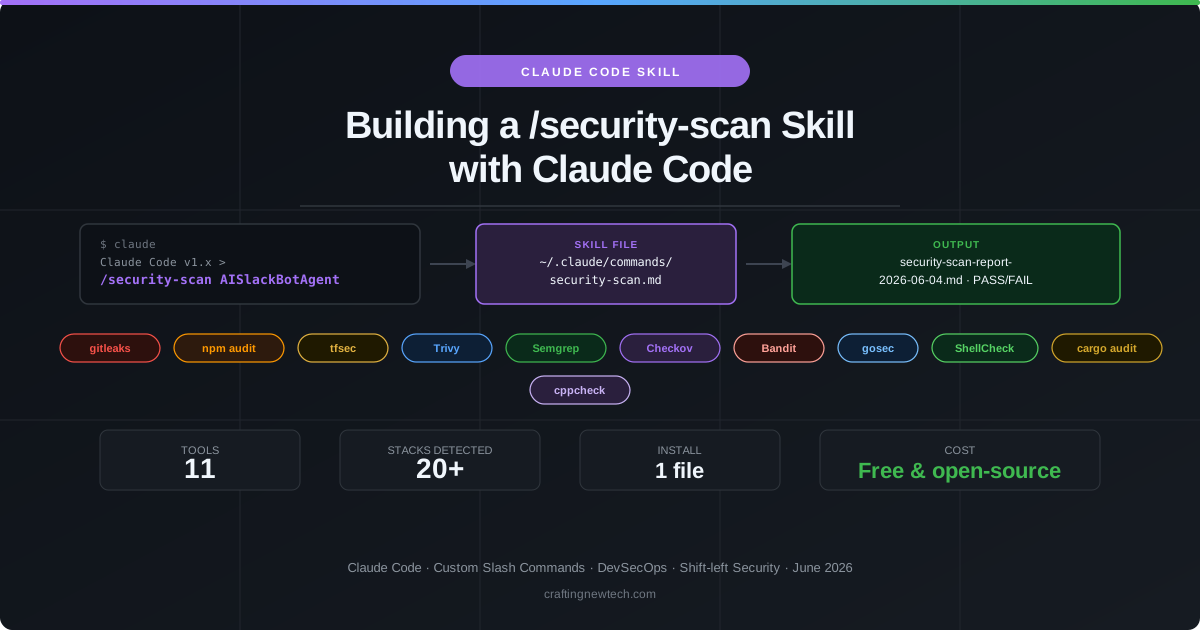
Security scanning should be effortless. The tools exist, the rules are well-established, and the threat categories are well-understood. The problem is that running eleven different tools across a heterogeneous codebase — each with its own CLI flags, output formats, and installation requirements — takes time and mental overhead that most developers simply do not spend before a push.
This article documents how I built a Claude Code custom slash command called /security-scan that solves this exactly. You type one command. Claude detects your stack, runs every applicable tool, and produces a structured Markdown report with findings sorted by severity and actionable remediation steps. If all tools pass, you push. If any fail, the report tells you precisely what to fix.
What Is a Claude Code Skill?
Claude Code supports custom slash commands — prompts stored as Markdown files in ~/.claude/commands/ (global) or .claude/commands/ (project-local). When you type /command-name [arguments], Claude Code:
- Loads the corresponding
.mdfile - Substitutes the
$ARGUMENTSplaceholder with whatever you typed after the command name - Sends the resulting prompt to Claude as an instruction set
- Executes it in the current working directory with full access to Bash, file system, and all other Claude Code tools
This mechanism turns a carefully written Markdown document into a repeatable, parameterized workflow — no scripting language required, no CI configuration, no external service. The entire skill is one file.
The global location means the skill is available in every project you open, immediately, without any per-project setup.
Design Goals
Before writing a single line, I established four constraints:
- Zero configuration per project — the skill must work in any repo by inspecting what is there, not by reading a config file the developer has to create.
- Graceful degradation — if a tool is not installed, skip it and note it in the report. Do not crash.
- No false mandate — only run tools relevant to the detected stack. A pure Python project should not wait for a Terraform scan.
- Actionable output — every finding must include the file, line number, rule ID, and a remediation command. Generic warnings are not useful.
The Skill File: Structure and Logic
The skill file lives at ~/.claude/commands/security-scan.md. It is a structured prompt divided into eight sequential steps that Claude follows when the command is invoked.
Step 1: Parse Arguments
The first line of the skill file declares the arguments placeholder:
Run a full security scan on the current project. Arguments: $ARGUMENTSClaude Code substitutes $ARGUMENTS at invocation time. The skill parses three optional flags:
| Flag | Effect |
|---|---|
--dir <path> | Scan a specific subdirectory instead of the project root |
--severity CRITICAL | Filter the report to CRITICAL findings only |
--fix | Attempt auto-fixes after scanning (npm audit fix, patch hints) |
Any remaining text is treated as a project name, resolved as $HOME_DIR/<project-name>. No argument means the current working directory.
Examples:
/security-scan                          # scan current directory
/security-scan AISlackBotAgent          # scan a named project
/security-scan --dir ./website          # scan a subdirectory
/security-scan --severity CRITICAL      # report only CRITICAL findings
/security-scan --fix                    # scan then attempt auto-fixes
Step 2–3: Verify Target and Check Prerequisites
Before running any scan, the skill verifies the target directory exists and checks which tools are installed using their version commands. Missing tools are marked as MISSING — they will be skipped and listed at the end of the report with install instructions.
Step 4: Stack Detection
This is the most important step. The skill inspects the target directory for 20+ signals and sets boolean flags accordingly. No flag, no scan.
HAS_NPM        → package.json found
HAS_TERRAFORM  → any *.tf file found
HAS_DOCKER     → any Dockerfile found
HAS_PYTHON     → *.py / requirements.txt / pyproject.toml
HAS_GO         → go.mod or *.go files
HAS_RUST       → Cargo.toml
HAS_BASH       → any *.sh file
HAS_K8S        → k8s/ directory or YAML with 'kind:' at root
HAS_CDK        → cdk.json
HAS_CFN        → YAML/JSON with AWSTemplateFormatVersion
HAS_BICEP      → *.bicep files
HAS_PULUMI     → Pulumi.yaml
HAS_ANSIBLE    → roles/ directory or YAML with hosts: + tasks:
... and more
A monorepo with a Node.js frontend, Terraform infrastructure, and Python Lambda functions will activate HAS_NPM, HAS_TERRAFORM, and HAS_PYTHON simultaneously, triggering npm audit, tfsec, Trivy, Semgrep, Bandit, gitleaks, and Checkov in the same run.
The 11 Tools
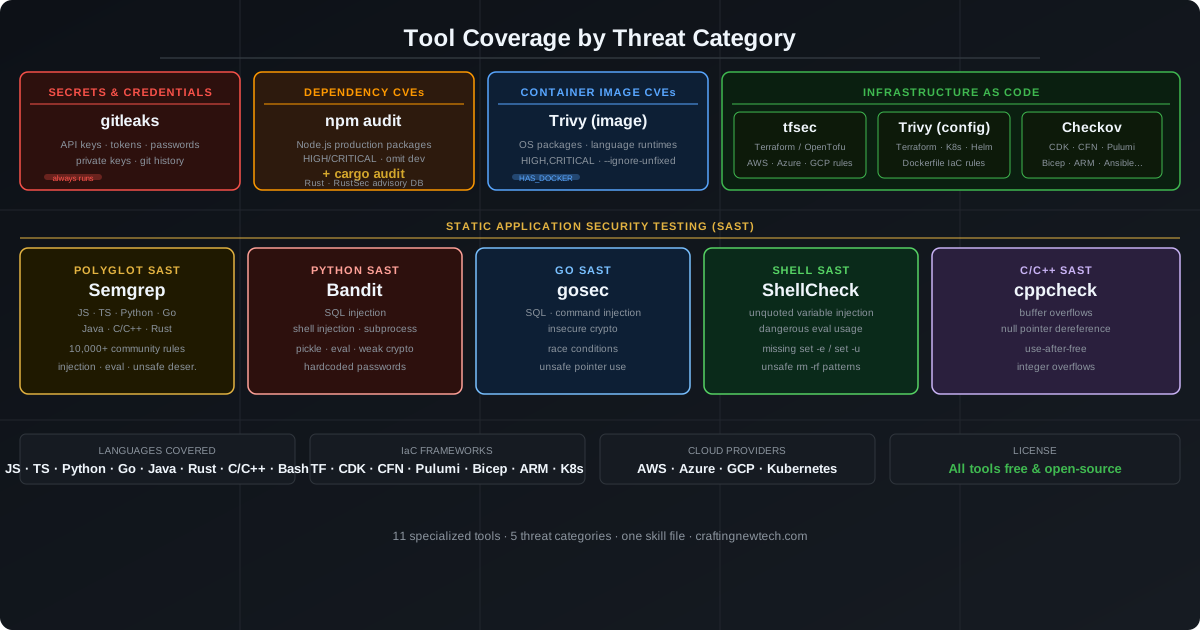
Each tool owns a specific threat category. No tool tries to do everything. This is intentional — specialists outperform generalists in security scanning because they have deep rule sets, lower false-positive rates, and faster execution for their domain.
1. gitleaks — Secrets and Credentials
Runs: Always (every project with a .git/ directory)
What it catches: API keys, OAuth tokens, database passwords, private keys, and over 150 other credential patterns hardcoded anywhere in your repository — including the full git history, not just the current working tree.
gitleaks detect --source . --verbose --redactA hardcoded secret in git history cannot be deleted — it requires rotating the credential and rewriting history. Prevention at commit time is the only practical defense. gitleaks is the only tool in this stack that runs unconditionally because every project has a git history and every developer can accidentally commit a credential.
False positive management: Create .gitleaks.toml in the repo root to allowlist test fixtures:
[[allowlist]]
description = "Test fixture dummy credentials"
paths = ["tests/fixtures/", "docs/examples/"]
2. npm audit — Node.js Dependency CVEs
Runs: When HAS_NPM is set
What it catches: Known CVEs in your production npm dependency tree, matched against the npm advisory database. The --omit=dev flag scopes the scan to packages that actually ship to production — dev dependencies are not excluded from analysis, they are excluded from the failure gate, since they do not run in production.
npm audit --audit-level=high --omit=dev --jsonThe skill finds every package.json in the repository (excluding node_modules) and runs a separate audit for each, covering monorepos with multiple service packages.
Severity gate: HIGH and CRITICAL. Moderate and Low findings are reported but do not fail the scan.
3. tfsec — Terraform IaC Misconfigurations
Runs: When HAS_TERRAFORM is set
What it catches: Security misconfigurations in AWS, Azure, and GCP Terraform resources — unencrypted S3 buckets, security groups open to 0.0.0.0/0, IAM policies with wildcard actions, missing CloudTrail logging, public RDS instances, and hundreds of other provider-specific rules.
tfsec . --minimum-severity HIGH --format jsontfsec reads only .tf files and understands HCL deeply — it can follow module references and variable substitutions that a generic YAML parser would miss.
Suppression: Known-acceptable findings go in terraform/.tfsec/config.yml with a documented reason for each suppression.
4. Trivy — Container Image CVEs and IaC
Runs: When HAS_DOCKER (image scan) or HAS_TERRAFORM / HAS_K8S (config scan) are set
What it catches:
- Image scan: OS-level packages in Docker base images with known CVEs, language runtime vulnerabilities, and application dependency CVEs — all within the container’s file system.
- Config scan: IaC misconfigurations in Terraform, Kubernetes manifests, Helm charts, and Dockerfiles.
# Container image
trivy image <tag> --severity HIGH,CRITICAL --ignore-unfixed --exit-code 1

# IaC / filesystem
trivy config . --severity HIGH,CRITICAL --exit-code 1
The --ignore-unfixed flag is critical for image scans. Without it, Trivy reports CVEs that have no available patch, producing hundreds of findings with no remediation path. Scoping to unfixed-only means every finding has a concrete action: upgrade the package.
5. Semgrep — Polyglot SAST
Runs: When any source code language is detected (JS, TS, Python, Go, Java, C/C++, Rust)
What it catches: Language-specific insecure coding patterns across 10,000+ community-maintained rules — SQL injection, command injection, eval() on user input, unsafe deserialization, hardcoded cryptographic keys, prototype pollution, path traversal, and more.
semgrep scan --config=auto --error --json .The --config=auto flag downloads the ruleset appropriate for the languages detected in the scanned directory. Semgrep is the only tool here that works across all major languages in a single invocation — it is the polyglot SAST layer.
6. Checkov — Multi-Framework IaC
Runs: When any IaC stack is detected
What it catches: Security misconfigurations in IaC frameworks that tfsec and Trivy do not fully cover — AWS CDK, CloudFormation, Pulumi, Azure Bicep, ARM templates, Crossplane, Ansible, and more.
checkov -d . --framework terraform,cloudformation,kubernetes,dockerfile \
  --quiet --compact --severity HIGH
Checkov’s value is breadth. If your project uses CDK or CloudFormation alongside Terraform, tfsec covers the .tf files but misses the synthesized CloudFormation templates. Checkov fills that gap.
| IaC Framework | Checkov Framework Arg |
|---|---|
| Terraform / OpenTofu | terraform |
| AWS CDK (via cdk synth) | cloudformation |
| CloudFormation | cloudformation |
| Pulumi | pulumi |
| Azure Bicep | bicep |
| Azure ARM | arm |
| Kubernetes | kubernetes |
| Dockerfile | dockerfile |
| Ansible | ansible |
7. Bandit — Python SAST
Runs: When HAS_PYTHON is set
What it catches: Python-specific security antipatterns — SQL injection via string formatting, shell injection via subprocess.run(shell=True), insecure use of pickle, dangerous eval(), weak cryptographic primitives (MD5, SHA1), and hardcoded passwords.
bandit -r . -ll -ii --format jsonSemgrep also covers Python, but Bandit’s Python-native rule set catches patterns that generic SAST misses. Both run when Python is detected; the findings are reported separately.
8. gosec — Go SAST
Runs: When HAS_GO is set
What it catches: Go-specific security issues — SQL query construction with fmt.Sprintf, os/exec command injection, use of weak random number generators (math/rand instead of crypto/rand), integer overflow in type conversions, hardcoded credentials, TLS configuration issues, and potential race conditions.
gosec -fmt json -severity medium -confidence medium ./...9. ShellCheck — Bash/Shell Script Analysis
Runs: When HAS_BASH is set
What it catches: Shell script vulnerabilities — unquoted variable expansion that enables word splitting and path injection, use of eval on external input, missing set -e (silent failure) or set -u (unbound variable access), and dangerous rm -rf patterns with unquoted variables.
shellcheck --severity=warning --format=json <file>Shell scripts are pervasive in CI/CD pipelines and deployment automation. They are also among the most common sources of command injection vulnerabilities in infrastructure tooling.
10. cargo audit — Rust Dependency CVEs
Runs: When HAS_RUST is set
What it catches: Known CVEs in Rust dependencies, matched against the RustSec advisory database — the Rust ecosystem’s equivalent of the npm advisory database.
cargo audit --json11. cppcheck — C/C++ Static Analysis
Runs: When HAS_CPP is set
What it catches: Memory safety issues in C and C++ code — buffer overflows, null pointer dereferences, use-after-free, integer overflows, double-free errors, and uninitialized variable reads.
cppcheck --enable=warning,style,performance,portability \
  --error-exitcode=1 --suppress=missingIncludeSystem .
Execution Flow
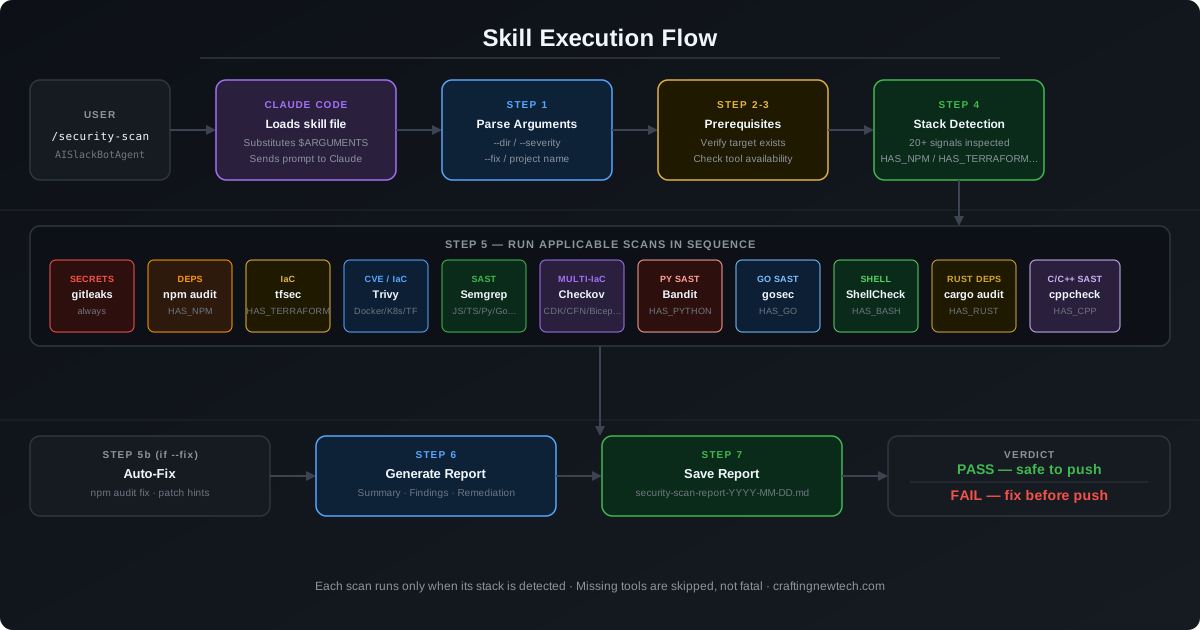
The flow is linear and sequential: parse arguments → check prerequisites → detect stack → run applicable scans → optionally auto-fix → generate report → save to disk → print install instructions for missing tools.
Key design decisions in the flow:
- Scans do not stop on failure. If npm audit finds a HIGH vulnerability, the scan continues through tfsec, Trivy, Semgrep, and every other applicable tool. The report reflects the full picture, not just the first problem.
- Missing tools produce PARTIAL, not FAIL. A missing Semgrep installation does not fail the scan — it adds a “Skipped” row to the report and prints an install instruction at the end. A PARTIAL report tells you results are incomplete and names what to install.
- Docker image scan is build-then-scan. The skill builds the image using a temporary tag (
security-scan-<dirname>:latest), runs Trivy, then removes the image. This avoids leaving scan artifacts in your local Docker image store.
The Report
Every run produces a security-scan-report-YYYY-MM-DD.md file in the project root. The report has five sections:
Summary table — one row per tool, showing PASS / FAIL / SKIPPED and the count and highest severity of findings. The overall status (PASS, FAIL, or PARTIAL) appears in the header.
Findings detail — one subsection per tool with findings. Each finding includes the exact file path, line number, rule ID, severity, and a description. Tools with zero findings are omitted from this section.
Remediation steps — a numbered list ordered by severity (CRITICAL first, then HIGH). Each item specifies exactly what to change and includes the command to apply the fix where one exists.
Skipped checks — every tool that was not run, with the reason: not installed, or stack not detected.
Next steps — a push-readiness verdict:
Status: PASS— safe to pushStatus: FAIL— fix the listed findings before pushing, then re-runStatus: PARTIAL— install missing tools for a complete scan, then re-run
Installation
Step 1: Create the global commands directory
mkdir -p ~/.claude/commandsStep 2: Create the skill file
Save the skill prompt to ~/.claude/commands/security-scan.md. The full prompt content is structured in eight steps as described in this article. The file is plain Markdown — no special syntax beyond the $ARGUMENTS placeholder on the first line.
Step 3: Install the tools
Install whichever tools apply to your typical projects. Missing tools are skipped automatically.
macOS (Homebrew)
brew install gitleaks       # secrets — always recommended
brew install trivy          # containers + IaC
brew install tfsec          # Terraform
brew install semgrep        # polyglot SAST (or: pip install semgrep)
brew install gosec          # Go SAST
brew install shellcheck     # shell scripts
brew install cppcheck       # C/C++

# Python (pip)
pip install bandit          # Python SAST
pip install checkov         # multi-framework IaC (or: brew install checkov)

# Rust (cargo — install via https://rustup.rs)
cargo install cargo-audit
Linux (Debian/Ubuntu)
# gitleaks
curl -sSL https://github.com/gitleaks/gitleaks/releases/latest/download/gitleaks_linux_x64.tar.gz \
  | tar -xz && sudo mv gitleaks /usr/local/bin/

# Trivy
curl -sfL https://raw.githubusercontent.com/aquasecurity/trivy/main/contrib/install.sh \
  | sudo sh -s -- -b /usr/local/bin

# tfsec
curl -sSL https://github.com/aquasecurity/tfsec/releases/latest/download/tfsec-linux-amd64 \
  -o /usr/local/bin/tfsec && chmod +x /usr/local/bin/tfsec

# Semgrep, Checkov, Bandit (pip)
pip install semgrep checkov bandit

# gosec
curl -sSL https://raw.githubusercontent.com/securego/gosec/master/install.sh \
  | sudo sh -s -- -b /usr/local/bin

# ShellCheck and cppcheck
sudo apt-get install -y shellcheck cppcheck

# cargo audit (requires Rust — https://rustup.rs)
cargo install cargo-audit
For RPM-based distros (RHEL, Fedora, Amazon Linux) replace
apt-getwithdnfand use the equivalent package names.
Windows (PowerShell)
Prerequisite: install Git for Windows and Python first. Claude Code requires WSL2 or Git Bash on Windows.
# winget (built into Windows 11)
winget install gitleaks
winget install AquaSecurity.Trivy

# tfsec binary
Invoke-WebRequest -Uri https://github.com/aquasecurity/tfsec/releases/latest/download/tfsec-windows-amd64.exe `
  -OutFile "$env:LOCALAPPDATA\Microsoft\WindowsApps\tfsec.exe"

# Semgrep, Checkov, Bandit (pip)
pip install semgrep checkov bandit

# gosec binary
Invoke-WebRequest -Uri https://github.com/securego/gosec/releases/latest/download/gosec_windows_amd64.zip `
  -OutFile gosec.zip
Expand-Archive gosec.zip -DestinationPath "$env:LOCALAPPDATA\Microsoft\WindowsApps\"
Remove-Item gosec.zip

# ShellCheck and cppcheck via Scoop (https://scoop.sh)
scoop install shellcheck cppcheck

# cargo audit (requires Rust — https://rustup.rs)
cargo install cargo-audit
Verify everything is on your PATH:
gitleaks version && trivy --version && tfsec --version && \
semgrep --version && bandit --version && checkov --version
Step 4: Run your first scan
cd /path/to/your-project
/security-scan
That is the entire setup. The skill is now available in every project directory you open in Claude Code.
Practical Workflow
I run /security-scan as the last step before every git push. The workflow is:
- Make changes, run tests locally
git add <files>/security-scan— if PASS, proceed; if FAIL, fix then re-scangit commit -m "..."andgit push
For a typical project with a Node.js frontend and Terraform infrastructure, the full scan takes 30–60 seconds. That is a small investment relative to the cost of discovering a HIGH vulnerability in a deployed environment.
The --fix flag accelerates the common case where npm audit found an auto-patchable vulnerability:
/security-scan --fixClaude runs npm audit fix, re-scans to confirm the fix landed, and updates the report — all in one step.
Extending the Skill
The skill file is plain text. Extending it means editing the Markdown:
- Add a new tool: Add a new subsection under Step 5 with the detection flag, command, and failure condition.
- Add a new stack signal: Add a new
HAS_Xentry in Step 4 with the filesystem signal. - Change severity thresholds: Update the
--audit-level,--minimum-severity, or--severityflags in the relevant tool sections. - Add project-specific suppression: Create a project-local
.claude/commands/security-scan.mdthat overrides the global one with additional suppression rules.
Because the skill is a prompt, Claude can also adapt dynamically — if it encounters an unexpected tool output format or a new version with different JSON schema, it will attempt to parse it rather than crashing on an unrecognized format.
What the Skill Does Not Cover
Being explicit about the gaps:
- DAST (Dynamic Application Security Testing) — testing a live running application for runtime vulnerabilities. Requires a running server. Consider OWASP ZAP for exposed HTTP endpoints.
- License compliance — open-source license compatibility scanning. Consider
license-checker(npm) or FOSSA for commercial software. - Runtime threat detection — anomalous behavior in a running container or process. Falco and AWS GuardDuty operate at this layer.
- Supply chain integrity — verifying that a package has not been tampered with between publication and install. Lockfiles (
package-lock.json,Cargo.lock) mitigate this significantly. - Windows — tools are supported but some require manual binary downloads or Scoop. See the Installation section above for PowerShell instructions.
Key Takeaways
Security scanning is not a CI-only concern. Running these tools locally before every push catches issues in seconds rather than minutes, protects the main branch, and avoids the feedback loop of push → wait → read CI output → fix → push again.
The Claude Code skill model makes this practical. One file. One command. Works in every project. No configuration. The tools do the work; Claude handles the orchestration, the output normalization, and the report generation.
The only thing left to do is install the tools and type /security-scan.
Get the Skill
The skill file is available on GitHub. Install it with a single command:
mkdir -p ~/.claude/commands

curl -sL https://raw.githubusercontent.com/jbaez22/security-scan/main/commands/security-scan.md \
  -o ~/.claude/commands/security-scan.md
Repository: github.com/jbaez22/security-scan
The repo includes the full skill file, installation instructions, and the complete tool reference. Pull requests and issues welcome.