Fine-Tuning a Private LLM on AWS — Task-Specific, Secure, and Cost-Effective
Introduction
Most teams reach for a hosted API when they first build with LLMs — and that is usually the right call. But there is a class of problem where a general-purpose model is not enough: domain-specific terminology, proprietary workflows, strict data-residency requirements, cost at scale, or simply behavior that a system prompt alone cannot reliably produce.
That is when fine-tuning a private model becomes the right tool. The catch is that fine-tuning has a reputation for being expensive, complex, and risky to production data. This guide challenges all three of those assumptions.
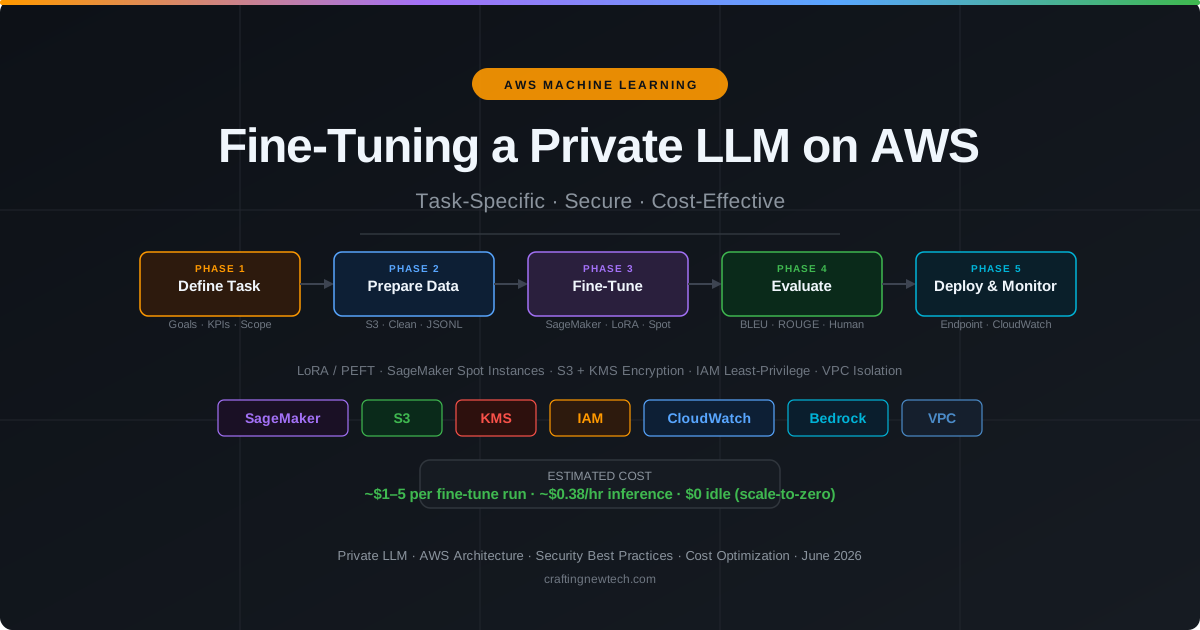
Using open-weight models (Llama 3 8B or Mistral 7B), AWS SageMaker Spot instances, and Parameter-Efficient Fine-Tuning (PEFT/LoRA), you can run a full fine-tune for $1–5, keep training data inside your VPC, and deploy a scale-to-zero endpoint that costs nothing when idle.
When to Fine-Tune vs. Use RAG
Fine-tuning is not always the right answer. Before committing to it, run through this decision tree:
| Signal | Approach |
|---|---|
| Need up-to-date facts or external documents | RAG first — cheaper and faster to iterate |
| Behavior or style the model consistently gets wrong | Fine-tune — changes the model’s defaults |
| Need sub-100ms latency at scale | Fine-tune — smaller specialized model is faster |
| Data-residency or privacy requirements | Fine-tune private model — data never leaves your account |
| Small prompt changes fix 80% of issues | Prompt engineering first |
| Domain-specific vocabulary the model mis-handles | Fine-tune — embeds vocabulary into weights |
The most effective approach is to try RAG and prompt engineering first. Fine-tune only when you have a clear, measurable gap that prompt engineering cannot close. Once you decide to fine-tune, the architecture below keeps it secure and affordable.
Part 1 — Architecture Overview
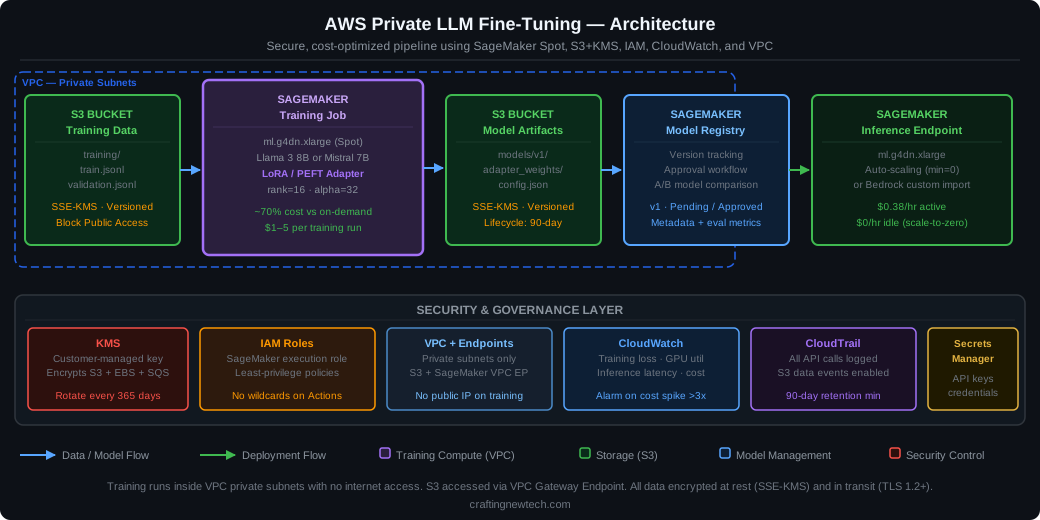
Figure 1: End-to-end AWS architecture. Training runs inside a VPC private subnet with no public IP. S3 is accessed via VPC Gateway Endpoint. All data is encrypted at rest (SSE-KMS) and in transit (TLS 1.2+).
The pipeline has five stages:
- S3 Training Data — Cleaned, formatted training data stored in a private S3 bucket with SSE-KMS encryption and versioning.
- SageMaker Training Job — LoRA fine-tuning job running on a Spot instance inside a VPC private subnet. Accesses S3 exclusively via VPC endpoint.
- S3 Model Artifacts — The trained LoRA adapter weights, stored with lifecycle policies.
- SageMaker Model Registry — Version tracking, approval workflow, and eval metric storage.
- SageMaker Endpoint / Bedrock Import — The serving layer, auto-scaling to zero when idle.
The security and governance layer spans all stages: KMS key management, IAM least-privilege roles, VPC network isolation, CloudWatch metrics and alarms, CloudTrail API auditing, and Secrets Manager for any third-party credentials.
Part 2 — Data Preparation: The Most Important Step
Fine-tuning amplifies your data. Good data produces a better model. Bad data produces a confidently wrong model. Spend more time here than anywhere else.
2.1 The Instruction-Tuning Format
The most effective format for task-specific fine-tuning is instruction tuning — you provide the model with (prompt, completion) pairs that demonstrate the exact behavior you want. Store these as JSONL:
# training/train.jsonl
{"prompt": "Classify the following support ticket as BILLING, TECHNICAL, or GENERAL.\n\nTicket: My invoice shows double charges for last month.\n\nCategory:", "completion": "BILLING"}
{"prompt": "Classify the following support ticket as BILLING, TECHNICAL, or GENERAL.\n\nTicket: The API returns a 502 error when I call /v2/orders.\n\nCategory:", "completion": "TECHNICAL"}
{"prompt": "Classify the following support ticket as BILLING, TECHNICAL, or GENERAL.\n\nTicket: What are your office hours?\n\nCategory:", "completion": "GENERAL"}
Keep prompts consistent — same phrasing, same structure, same output format across all examples. Inconsistency is the most common cause of poor fine-tune results.
2.2 How Much Data Do You Need?
Less than you think. LoRA works well with small datasets because it is teaching behavior, not knowledge:
| Task complexity | Minimum examples | Sweet spot |
|---|---|---|
| Simple classification (3–5 classes) | 200–500 | 1,000–2,000 |
| Structured output (JSON, tables) | 500–1,000 | 2,000–5,000 |
| Style / tone adaptation | 1,000–2,000 | 5,000–10,000 |
| Complex reasoning in a domain | 5,000+ | 10,000–50,000 |
More data helps up to a point. Beyond 10x the sweet spot, returns diminish and training cost rises linearly.
2.3 Data Cleaning Pipeline
import json
import re
import boto3
from typing import Iterator

comprehend = boto3.client("comprehend", region_name="us-east-1")

PII_PATTERNS = {
    "ssn":    r"\b\d{3}-\d{2}-\d{4}\b",
    "cc":     r"\b(?:\d{4}[\s-]?){3}\d{4}\b",
    "email":  r"\b[\w.+\-]+@[\w.\-]+\.[a-z]{2,}\b",
    "phone":  r"\b\(?\d{3}\)?[\s.\-]\d{3}[\s.\-]\d{4}\b",
}

def strip_pii(text: str) -> str:
    for label, pattern in PII_PATTERNS.items():
        text = re.sub(pattern, f"[{label.upper()}]", text, flags=re.IGNORECASE)
    return text

def is_quality(example: dict, min_tokens: int = 50) -> bool:
    """Reject examples that are too short, empty, or structurally broken."""
    prompt = example.get("prompt", "")
    completion = example.get("completion", "")
    total_tokens = (len(prompt) + len(completion)) // 4  # rough estimate
    return bool(prompt.strip()) and bool(completion.strip()) and total_tokens >= min_tokens

def deduplicate(examples: list[dict]) -> list[dict]:
    seen = set()
    out = []
    for ex in examples:
        key = (ex["prompt"].strip(), ex["completion"].strip())
        if key not in seen:
            seen.add(key)
            out.append(ex)
    return out

def prepare_dataset(raw_path: str, output_path: str) -> None:
    with open(raw_path) as f:
        examples = [json.loads(line) for line in f if line.strip()]

    # Clean
    for ex in examples:
        ex["prompt"]     = strip_pii(ex["prompt"])
        ex["completion"] = strip_pii(ex["completion"])

    # Filter
    examples = [ex for ex in examples if is_quality(ex)]

    # Deduplicate
    examples = deduplicate(examples)

    # Write
    with open(output_path, "w") as f:
        for ex in examples:
            f.write(json.dumps(ex) + "\n")

    print(f"Final dataset: {len(examples)} examples written to {output_path}")
After cleaning, upload to your encrypted S3 bucket:
# Upload with server-side encryption using your KMS key
aws s3 cp train.jsonl s3://your-bucket/training/train.jsonl \
  --sse aws:kms \
  --sse-kms-key-id alias/llm-training-key
2.4 Business Best Practice — Version Your Data
Tag every training dataset with a version, date, and description before you start a run. When a model regression occurs (and it will), the first question is always “what changed in the data?” Without versioning, you cannot answer it.
# Store a manifest alongside every dataset upload
manifest = {
    "version": "v3",
    "date": "2026-06-03",
    "examples": 1847,
    "description": "Added 500 billing edge cases from Q1 2026 escalations",
    "pipeline_sha": "abc123"  # git commit of the cleaning pipeline
}
Part 3 — Fine-Tuning with SageMaker + LoRA
3.1 Why LoRA Instead of Full Fine-Tuning
Full fine-tuning updates all model parameters — roughly 8 billion numbers for an 8B model. That requires multiple high-end GPUs, days of training, and thousands of dollars.
LoRA (Low-Rank Adaptation) inserts small trainable weight matrices (rank 16–64) alongside the frozen original weights. During fine-tuning, only those adapter matrices are updated — typically 0.1–1% of total parameters. The result:
- 10–100× less compute than full fine-tuning
- Same base model reused across multiple tasks (just swap adapters)
- Smaller storage — the adapter is a few hundred MB, not 16GB
- Mergeable — adapters can be merged into the base model for zero-overhead inference
3.2 SageMaker Training Job with Spot Instances
import sagemaker
from sagemaker.huggingface import HuggingFace

sess = sagemaker.Session()
role = "arn:aws:iam::YOUR_ACCOUNT:role/sagemaker-training-role"

# Training script expects: HF_MODEL_ID, LORA_R, LORA_ALPHA, etc.
hyperparameters = {
    "model_id":          "meta-llama/Meta-Llama-3-8B",
    "dataset_path":      "/opt/ml/input/data/training",
    "output_dir":        "/opt/ml/model",
    "lora_r":            16,
    "lora_alpha":        32,
    "lora_dropout":      0.05,
    "lora_target_modules": "q_proj,v_proj,k_proj,o_proj",
    "num_train_epochs":  3,
    "per_device_train_batch_size": 4,
    "learning_rate":     2e-4,
    "fp16":              True,
    "gradient_checkpointing": True,
}

estimator = HuggingFace(
    entry_point="train.py",
    source_dir="./src",
    role=role,
    instance_type="ml.g4dn.xlarge",   # 1× T4 GPU — cheapest GPU instance
    instance_count=1,
    transformers_version="4.36",
    pytorch_version="2.1",
    py_version="py310",
    hyperparameters=hyperparameters,

    # Spot configuration — 70% cheaper than on-demand
    use_spot_instances=True,
    max_wait=7200,          # total wall-clock budget (seconds)
    max_run=5400,           # max actual training time

    # Security
    subnets=["subnet-PRIVATE123"],                 # private subnet only
    security_group_ids=["sg-TRAINING456"],
    encrypt_inter_container_traffic=True,
    output_kms_key="alias/llm-training-key",       # encrypt model artifacts
    volume_kms_key="alias/llm-training-key",       # encrypt training volume
)

estimator.fit(
    {"training": f"s3://your-bucket/training/"},
    job_name=f"llm-lora-v3-{int(time.time())}",
)
3.3 The Training Script
# src/train.py
import os
import json
from datasets import Dataset
from transformers import AutoTokenizer, AutoModelForCausalLM, TrainingArguments
from peft import LoraConfig, get_peft_model, TaskType
from trl import SFTTrainer

def load_jsonl(path: str) -> Dataset:
    records = []
    for fname in os.listdir(path):
        if fname.endswith(".jsonl"):
            with open(os.path.join(path, fname)) as f:
                for line in f:
                    rec = json.loads(line)
                    # Merge prompt + completion into a single "text" field
                    rec["text"] = rec["prompt"] + rec["completion"] + tokenizer.eos_token
                    records.append(rec)
    return Dataset.from_list(records)

model_id  = os.environ.get("SM_HP_MODEL_ID", "meta-llama/Meta-Llama-3-8B")
data_path = os.environ.get("SM_CHANNEL_TRAINING", "/opt/ml/input/data/training")
out_dir   = os.environ.get("SM_MODEL_DIR", "/opt/ml/model")

tokenizer = AutoTokenizer.from_pretrained(model_id, use_fast=True)
tokenizer.pad_token = tokenizer.eos_token

model = AutoModelForCausalLM.from_pretrained(
    model_id,
    device_map="auto",
    torch_dtype="auto",
)
model.config.use_cache = False  # required for gradient checkpointing

lora_config = LoraConfig(
    task_type=TaskType.CAUSAL_LM,
    r=int(os.environ.get("SM_HP_LORA_R", 16)),
    lora_alpha=int(os.environ.get("SM_HP_LORA_ALPHA", 32)),
    lora_dropout=float(os.environ.get("SM_HP_LORA_DROPOUT", 0.05)),
    target_modules=os.environ.get("SM_HP_LORA_TARGET_MODULES", "q_proj,v_proj").split(","),
    bias="none",
)
model = get_peft_model(model, lora_config)
model.print_trainable_parameters()  # logs e.g. "trainable params: 6,553,600 (0.08%)"

dataset = load_jsonl(data_path)

training_args = TrainingArguments(
    output_dir=out_dir,
    num_train_epochs=int(os.environ.get("SM_HP_NUM_TRAIN_EPOCHS", 3)),
    per_device_train_batch_size=int(os.environ.get("SM_HP_PER_DEVICE_TRAIN_BATCH_SIZE", 4)),
    learning_rate=float(os.environ.get("SM_HP_LEARNING_RATE", 2e-4)),
    fp16=True,
    gradient_checkpointing=True,
    logging_steps=50,
    save_strategy="epoch",
    report_to="none",   # avoid external telemetry inside VPC
)

trainer = SFTTrainer(
    model=model,
    args=training_args,
    train_dataset=dataset,
    dataset_text_field="text",
    max_seq_length=2048,
)

trainer.train()
model.save_pretrained(out_dir)
tokenizer.save_pretrained(out_dir)
Part 4 — Data Flow: End to End
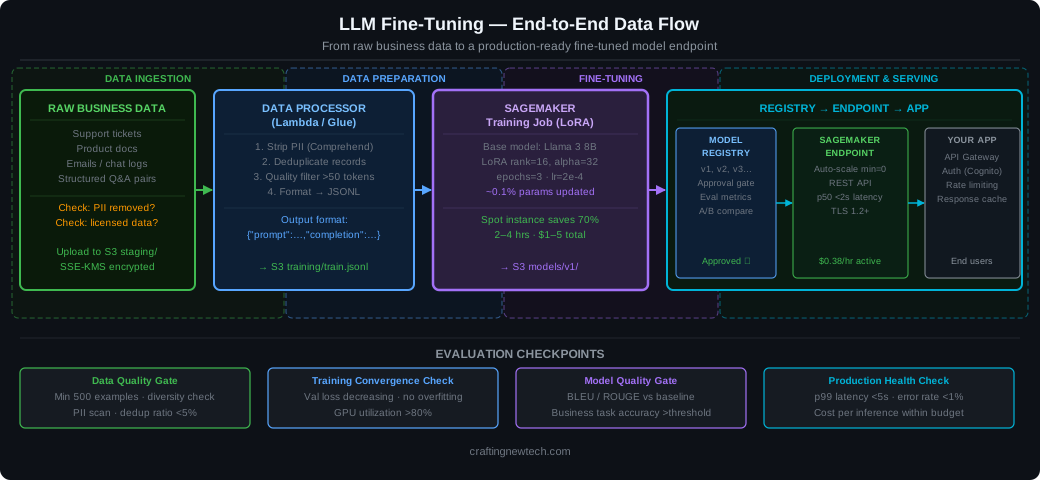
Figure 2: Complete data flow from raw business data through the fine-tuning pipeline to a production inference endpoint. Four evaluation checkpoints catch quality issues before they reach production.
The diagram captures the four evaluation checkpoints that prevent bad data or undertrained models from reaching users:
- Data Quality Gate — minimum example count, PII scan, dedup ratio check
- Training Convergence Check — validation loss must be decreasing; GPU utilization should be high
- Model Quality Gate — BLEU/ROUGE vs baseline model; business task accuracy above threshold
- Production Health Check — p99 latency under 5 seconds, error rate under 1%, cost per inference within budget
Never skip these gates under time pressure. A poorly trained model is worse than no model — it erodes user trust without a visible error.
Part 5 — Security Hardening
5.1 IAM Role for SageMaker Training
The SageMaker execution role should only have access to the specific resources it needs:
{
  "Version": "2012-10-17",
  "Statement": [
    {
      "Sid": "S3TrainingData",
      "Effect": "Allow",
      "Action": ["s3:GetObject", "s3:ListBucket"],
      "Resource": [
        "arn:aws:s3:::your-bucket",
        "arn:aws:s3:::your-bucket/training/*"
      ]
    },
    {
      "Sid": "S3ModelArtifacts",
      "Effect": "Allow",
      "Action": ["s3:PutObject", "s3:GetObject"],
      "Resource": "arn:aws:s3:::your-bucket/models/*"
    },
    {
      "Sid": "KMSEncryption",
      "Effect": "Allow",
      "Action": ["kms:GenerateDataKey", "kms:Decrypt"],
      "Resource": "arn:aws:kms:us-east-1:YOUR_ACCOUNT:key/KEY_ID"
    },
    {
      "Sid": "ECRForContainerImages",
      "Effect": "Allow",
      "Action": ["ecr:GetAuthorizationToken", "ecr:BatchGetImage", "ecr:GetDownloadUrlForLayer"],
      "Resource": "*"
    },
    {
      "Sid": "CloudWatchLogs",
      "Effect": "Allow",
      "Action": ["logs:CreateLogGroup", "logs:CreateLogStream", "logs:PutLogEvents"],
      "Resource": "arn:aws:logs:us-east-1:YOUR_ACCOUNT:log-group:/aws/sagemaker/*"
    }
  ]
}
Note what is absent: no iam:*, no s3:*, no wildcards on sensitive actions. The role can read training data, write model artifacts, use the KMS key, pull container images, and write logs — nothing else.
5.2 S3 Bucket Policy
{
  "Version": "2012-10-17",
  "Statement": [
    {
      "Sid": "DenyHTTP",
      "Effect": "Deny",
      "Principal": "*",
      "Action": "s3:*",
      "Resource": ["arn:aws:s3:::your-bucket", "arn:aws:s3:::your-bucket/*"],
      "Condition": {"Bool": {"aws:SecureTransport": "false"}}
    },
    {
      "Sid": "DenyUnencryptedUploads",
      "Effect": "Deny",
      "Principal": "*",
      "Action": "s3:PutObject",
      "Resource": "arn:aws:s3:::your-bucket/*",
      "Condition": {"StringNotEquals": {"s3:x-amz-server-side-encryption": "aws:kms"}}
    },
    {
      "Sid": "DenyNonVpcAccess",
      "Effect": "Deny",
      "Principal": "*",
      "Action": "s3:*",
      "Resource": ["arn:aws:s3:::your-bucket", "arn:aws:s3:::your-bucket/*"],
      "Condition": {"StringNotEquals": {"aws:SourceVpce": "vpce-YOUR_ENDPOINT_ID"}}
    }
  ]
}
This bucket refuses HTTP (only HTTPS allowed), refuses unencrypted uploads (SSE-KMS required), and refuses any access that does not originate from your VPC endpoint. This means even if credentials were compromised, the bucket is inaccessible from outside your VPC.
5.3 VPC Configuration for Training
# Terraform: VPC setup for SageMaker training
resource "aws_vpc_endpoint" "s3" {
  vpc_id            = aws_vpc.main.id
  service_name      = "com.amazonaws.us-east-1.s3"
  vpc_endpoint_type = "Gateway"
  route_table_ids   = [aws_route_table.private.id]
}

resource "aws_security_group" "sagemaker_training" {
  name   = "sagemaker-training"
  vpc_id = aws_vpc.main.id

  # No inbound rules — training job does not listen
  # Allow outbound only to S3 VPC endpoint and ECR
  egress {
    from_port   = 443
    to_port     = 443
    protocol    = "tcp"
    prefix_list_ids = [data.aws_prefix_list.s3.id]
  }
}
5.4 No Credentials in Code
Every credential the training script needs must come from IAM roles or Secrets Manager — never from environment variables in the SageMaker job definition, and never from constants in source code.
# WRONG — never do this
MODEL_TOKEN = "hf_abc123xyz..."
s3_client = boto3.client("s3", aws_access_key_id="AKIA...", aws_secret_access_key="...")

# CORRECT — IAM role provides access automatically
import boto3
s3_client = boto3.client("s3")  # uses instance profile / task role

# For HuggingFace Hub token (to download gated models):
import boto3
sm = boto3.client("secretsmanager")
secret = sm.get_secret_value(SecretId="llm-training/hf-token")
hf_token = secret["SecretString"]
5.5 CloudWatch Alarms
import boto3

cw = boto3.client("cloudwatch")

# Alert if training cost exceeds expected budget
cw.put_metric_alarm(
    AlarmName="llm-training-cost-spike",
    MetricName="EstimatedCharges",
    Namespace="AWS/Billing",
    Statistic="Maximum",
    Period=86400,
    EvaluationPeriods=1,
    Threshold=50.0,   # $50/day alert
    ComparisonOperator="GreaterThanThreshold",
    AlarmActions=["arn:aws:sns:us-east-1:YOUR_ACCOUNT:ops-alerts"],
)

# Alert if inference endpoint error rate spikes
cw.put_metric_alarm(
    AlarmName="llm-endpoint-errors",
    MetricName="Invocation5XXErrors",
    Namespace="AWS/SageMaker",
    Dimensions=[{"Name": "EndpointName", "Value": "llm-prod"}],
    Statistic="Sum",
    Period=300,
    EvaluationPeriods=2,
    Threshold=10,
    ComparisonOperator="GreaterThanThreshold",
    AlarmActions=["arn:aws:sns:us-east-1:YOUR_ACCOUNT:ops-alerts"],
)
Part 6 — Cost Optimization
6.1 Actual Cost Breakdown
A realistic fine-tuning run on 2,000 examples with Llama 3 8B:
| Item | Instance | Duration | Unit cost | Total |
|---|---|---|---|---|
| SageMaker Training (Spot) | ml.g4dn.xlarge | 3 hr | $0.38/hr | $1.14 |
| S3 Storage (training data + model) | — | 30 days | $0.023/GB | ~$0.10 |
| Data transfer (S3 → SageMaker via VPC EP) | — | — | $0.00 | $0.00 |
| CloudWatch logs | — | 30 days | negligible | ~$0.05 |
| Total per run | ~$1.30 |
For comparison, the same run on on-demand ml.g4dn.xlarge costs $3.82. Spot saves 70%.
6.2 Inference Cost with Scale-to-Zero
A ml.g4dn.xlarge SageMaker endpoint costs $0.38/hour when active and $0 when scaled to zero. If your use case is batch or low-traffic:
# Auto-scaling policy: scale to zero after 5 minutes of no traffic
import boto3

aas = boto3.client("application-autoscaling")

aas.register_scalable_target(
    ServiceNamespace="sagemaker",
    ResourceId="endpoint/llm-prod/variant/AllTraffic",
    ScalableDimension="sagemaker:variant:DesiredInstanceCount",
    MinCapacity=0,   # scale to zero
    MaxCapacity=3,
)

aas.put_scaling_policy(
    PolicyName="scale-to-zero-on-idle",
    ServiceNamespace="sagemaker",
    ResourceId="endpoint/llm-prod/variant/AllTraffic",
    ScalableDimension="sagemaker:variant:DesiredInstanceCount",
    PolicyType="TargetTrackingScaling",
    TargetTrackingScalingPolicyConfiguration={
        "TargetValue": 1.0,
        "CustomizedMetricSpecification": {
            "MetricName":   "ApproximateBacklogSizePerInstance",
            "Namespace":    "AWS/SageMaker",
            "Statistic":    "Average",
            "Unit":         "None",
        },
        "ScaleInCooldown":  300,  # 5 min idle before scale-down
        "ScaleOutCooldown": 30,
    },
)
Caveat: Scale-to-zero introduces cold-start latency (60–120 seconds for a 7B model). For latency-sensitive applications, keep MinCapacity=1 and accept the baseline $0.38/hour.
6.3 The LoRA Advantage at Scale
One of LoRA’s most underrated properties is the ability to share a single base model across multiple fine-tuned tasks. Instead of running three separate full-model endpoints, you run one base model and load the appropriate adapter at inference time:
from peft import PeftModel
from transformers import AutoModelForCausalLM

base_model = AutoModelForCausalLM.from_pretrained("meta-llama/Meta-Llama-3-8B")

# Load different adapters for different tasks
ticket_classifier = PeftModel.from_pretrained(base_model, "s3://your-bucket/models/ticket-v3/")
doc_summarizer    = PeftModel.from_pretrained(base_model, "s3://your-bucket/models/summary-v1/")
email_drafter     = PeftModel.from_pretrained(base_model, "s3://your-bucket/models/email-v2/")
Three fine-tuned capabilities, one base model loaded in memory, adapter switching in milliseconds.
Part 7 — Evaluation and Monitoring
7.1 Automated Metrics
Run evaluation after every training job before registering the model:
from evaluate import load as load_metric

rouge = load_metric("rouge")
bleu  = load_metric("bleu")

def evaluate_model(model, tokenizer, eval_dataset: list[dict]) -> dict:
    predictions, references = [], []

    for ex in eval_dataset:
        inputs = tokenizer(ex["prompt"], return_tensors="pt").to(model.device)
        with torch.no_grad():
            output = model.generate(**inputs, max_new_tokens=128)
        pred = tokenizer.decode(output[0][inputs["input_ids"].shape[-1]:], skip_special_tokens=True)
        predictions.append(pred.strip())
        references.append(ex["completion"].strip())

    return {
        "rouge1": rouge.compute(predictions=predictions, references=references)["rouge1"],
        "bleu":   bleu.compute(predictions=[p.split() for p in predictions],
                               references=[[r.split()] for r in references])["bleu"],
    }
Set a threshold: if the new model’s ROUGE-1 drops more than 5% below the currently deployed model, block the registry approval.
7.2 Business Metrics Are More Important Than BLEU
Automated metrics measure surface similarity to reference answers. They do not measure whether the model is actually useful. For a ticket classifier, the only metric that matters is classification accuracy on your held-out test set. For a document summarizer, human reviewers rating output quality on a 1–5 scale is more actionable than any automated metric.
Build a lightweight evaluation harness:
# evaluation/business_eval.py
import json
from typing import Callable

def run_task_eval(
    model_fn: Callable[[str], str],
    test_file: str,
    task: str = "classification"
) -> dict:
    with open(test_file) as f:
        examples = [json.loads(l) for l in f]

    correct = 0
    for ex in examples:
        prediction = model_fn(ex["prompt"]).strip()
        if task == "classification":
            correct += int(prediction == ex["completion"].strip())

    accuracy = correct / len(examples)
    print(f"Task accuracy: {accuracy:.2%} ({correct}/{len(examples)})")
    return {"accuracy": accuracy, "n": len(examples)}
Require a minimum accuracy threshold before deploying. If it falls below baseline (the non-fine-tuned model), the new version does not ship.
7.3 Drift Detection in Production
Models degrade over time as the real-world distribution shifts away from the training distribution. Log a sample of production inputs and outputs, and re-run your evaluation harness monthly:
# Lambda: sample 1% of inference requests for drift monitoring
import random, boto3, json

s3 = boto3.client("s3")

def handler(event, context):
    if random.random() < 0.01:  # 1% sample rate
        s3.put_object(
            Bucket="your-bucket",
            Key=f"drift-monitoring/{context.aws_request_id}.json",
            Body=json.dumps({
                "prompt":   event["prompt"],
                "response": event["response"],
                "timestamp": context.log_stream_name,
            }),
            ServerSideEncryption="aws:kms",
        )
Production Checklist
Data
- PII scrubbed from all training examples (regex scan + Comprehend)
- Training data versioned and tagged in S3
- Validation split held out before any fine-tuning begins
- No test data ever used during training or hyperparameter search
Security
- S3 bucket: block public access, SSE-KMS, versioning, lifecycle policies
- S3 bucket policy: deny HTTP, deny unencrypted uploads, deny non-VPC access
- SageMaker role: least-privilege — no
iam:*, nos3:*, scoped to project resources - Training job: private subnets only, no public IP, VPC endpoint for S3
- No credentials in source code, environment variables, or notebook cells
- CloudTrail data events enabled on training S3 bucket
Training
- Spot instances configured with
max_waitsafety budget - Output artifacts encrypted with KMS key (
output_kms_key) - Training volume encrypted with KMS key (
volume_kms_key) - Inter-container traffic encrypted (
encrypt_inter_container_traffic=True)
Evaluation & Deployment
- Automated metric gate: new model must match or exceed baseline BLEU/ROUGE
- Business accuracy gate: must exceed minimum threshold on task test set
- Model registered in SageMaker Model Registry before deployment
- Endpoint: auto-scaling configured (min=0 for low-traffic, min=1 for latency-sensitive)
- CloudWatch alarms: error rate, latency p99, and cost spike alerts
Operational
- Monthly drift evaluation scheduled against sampled production inputs
- Retraining trigger defined: drift > X% or new labeled data > Y examples
- Data retention policy: raw inputs not stored beyond 30 days (GDPR / privacy)
- Incident runbook: what to do if model starts producing wrong outputs in production
Key Takeaways
Fine-tuning a private LLM is no longer a six-figure infrastructure project. With LoRA/PEFT and SageMaker Spot instances, a complete fine-tuning run costs $1–5 and finishes in a few hours. The entire pipeline — from raw data to a serving endpoint — can be built in a weekend.
The non-negotiables are in the details: clean data, VPC isolation, SSE-KMS encryption everywhere, IAM least-privilege, and automated quality gates before every deployment. Skip any of these and you either ship a bad model or expose sensitive training data.
Start with the smallest dataset that produces a useful model. Measure business accuracy, not just BLEU scores. Deploy with auto-scaling to zero so the endpoint costs nothing when idle. Log a sample of production traffic and check for drift monthly.
The biggest mistake teams make is waiting until they have a “perfect” dataset. 500 high-quality, well-formatted examples will outperform 50,000 noisy ones every time. Start small, measure correctly, and iterate.