Closing the Security Scanning Gaps in Your CI/CD Pipeline
When I audited the security posture of my own CI/CD pipeline, I already had tfsec running as a required gate before every Terraform apply. HIGH findings block the deploy. Suppressions are documented and justified. It felt solid.
Then I asked a different question: what slips through even with tfsec in place?
The answer was uncomfortable. A hardcoded API key committed to git? tfsec misses it — it only reads .tf files. A vulnerable npm package in production? Not tfsec’s job. A Dockerfile pulling a base image with a known CVE from three years ago? Invisible to tfsec. A piece of JavaScript with a SQL injection pattern? Completely out of scope.
This article walks through how I closed those gaps by adding five targeted tools to the pipeline. Each one owns a specific threat category. Together they give defense-in-depth without overlap, alert fatigue, or cost.
What tfsec Already Covers
tfsec is excellent at what it does: static analysis of Terraform HCL for AWS, Azure, and GCP misconfigurations. In my pipeline it flags things like:
- S3 buckets without server-side encryption
- CloudFront distributions missing HTTPS enforcement
- IAM policies with overly broad wildcards
- Security groups open to
0.0.0.0/0
It runs as a required CI job (security) that must pass before the terraform job is allowed to run. A minimum severity of HIGH keeps the noise low while catching things that actually matter.
That is the right tool for that job. The problem is the threat surface extends well beyond Terraform files.
The Five Gaps — and the Tools That Fill Them
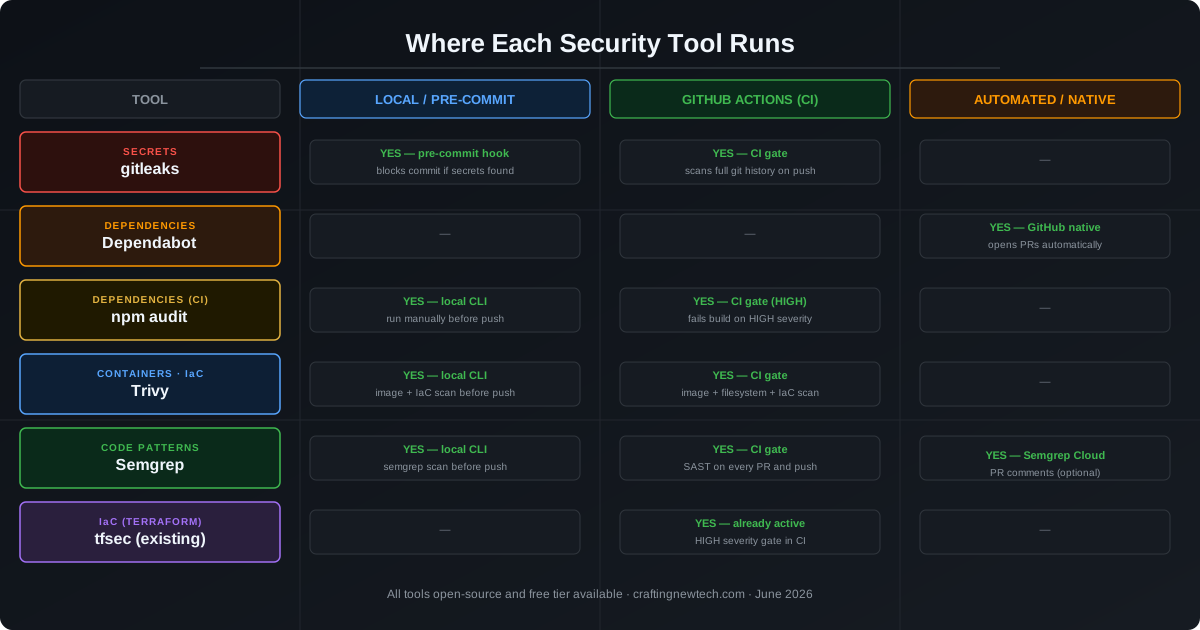
1. Secrets and Credentials — gitleaks
The threat: A developer accidentally commits an AWS secret key, a database password, or a Slack webhook token. It lands in git history. Even if the file is deleted in the next commit, the secret lives in every git clone forever.
Why tfsec misses it: tfsec only parses .tf files for cloud resource configuration. It does not scan arbitrary file content for credential patterns.
The fix: gitleaks scans git history and staged files for over 150 secret patterns using regular expressions. It runs at two points:
- Pre-commit hook — blocks the commit locally before anything reaches GitHub
- GitHub Actions — scans the full history on every push as a backstop
Installation is a single binary download or brew install gitleaks. The pre-commit hook catches 99% of accidents before they become incidents.
# Install
brew install gitleaks

# Test your repo
gitleaks detect --source . --verbose

# Add as a pre-commit hook
cat > .git/hooks/pre-commit << 'EOF'
#!/bin/bash
gitleaks protect --staged --verbose
EOF
chmod +x .git/hooks/pre-commit
The GitHub Actions step:
- name: Scan for secrets
  run: gitleaks detect --source . --verbose --redact
What to expect: A few false positives on test fixtures with dummy credentials. Create a .gitleaks.toml to allowlist them with a comment explaining why they are safe.
2. Dependency Vulnerabilities (Automated PRs) — Dependabot
The threat: A package you installed six months ago gets a CVE patch. You never know. It ships to production unmaintained.
Why tfsec misses it: Package manifests (package.json, go.mod, requirements.txt) are not Terraform files.
The fix: Dependabot is built into GitHub. Enable it with a single config file:
# .github/dependabot.yml
version: 2
updates:
  - package-ecosystem: npm
    directory: /website
    schedule:
      interval: weekly
    open-pull-requests-limit: 10

  - package-ecosystem: terraform
    directory: /terraform
    schedule:
      interval: weekly
Dependabot opens pull requests automatically when it detects a newer, patched version. Your CI runs on the PR, tests pass, you review and merge. Zero manual effort to stay current.
For Terraform, it bumps provider version constraints in required_providers blocks, which is something tfsec cannot do for you.
Cost: Free for all GitHub repositories.
3. Dependency Vulnerabilities (CI Gate) — npm audit
The threat: Even with Dependabot, a known-vulnerable package could be merged or introduced between Dependabot runs.
The fix: npm audit runs during CI and fails the build if any HIGH or CRITICAL severity vulnerability is found in production dependencies. This is the enforcement layer; Dependabot is the maintenance layer.
- name: Audit dependencies
  working-directory: ./website
  run: npm audit --audit-level=high --omit=dev
The --omit=dev flag is important. Dev dependencies are not shipped to production, so their vulnerabilities are lower risk and should not block a deploy. Audit only what runs in production.
Run it locally before every push as part of your pre-push checklist:
cd website && npm audit --audit-level=high --omit=devIf audit fails, the options are:
npm audit fix— automatic patch for most cases- Pin to a specific safe version in
package.json - Add a targeted suppression with documented rationale
4. Container Images and IaC Filesystem — Trivy
The threat: A Docker base image (e.g., node:20-alpine) contains OS-level CVEs from unpatched packages. These vulnerabilities ship to production inside every container you build.
Why tfsec misses it: tfsec does not pull or inspect container images.
The fix: Trivy by Aqua Security is a multi-purpose scanner that handles:
- Container images — OS packages, language runtimes, application dependencies
- Filesystems — local directories including
node_modules - IaC — Terraform, Kubernetes, Dockerfile, Helm (overlaps with tfsec but adds Dockerfile support)
- name: Scan container image
  uses: aquasecurity/trivy-action@master
  with:
    image-ref: 'your-image:${{ github.sha }}'
    format: 'table'
    severity: 'HIGH,CRITICAL'
    ignore-unfixed: true
    exit-code: '1'
The ignore-unfixed: true flag is critical. Without it, Trivy will flag hundreds of CVEs that have no available fix yet, making the output useless. Scope it to vulnerabilities where a patched version exists, so your team knows exactly what to upgrade.
For local use before push:
# Scan an image
trivy image your-image:latest --severity HIGH,CRITICAL --ignore-unfixed

# Scan IaC directory
trivy config ./terraform
5. Source Code Patterns (SAST) — Semgrep
The threat: A developer writes code with a known insecure pattern — an unsanitized template string in a shell command, a eval() call on user input, a hardcoded timeout that makes the app exploitable under load. These are logic-level vulnerabilities that static type checking and linting do not catch.
Why tfsec misses it: tfsec does not read JavaScript, TypeScript, Python, or Go source files.
The fix: Semgrep is a fast, rule-based SAST engine. The community rule registry (p/default, p/javascript, p/typescript, p/python) covers thousands of patterns maintained by security researchers. You can also write custom rules for patterns specific to your codebase.
- name: SAST scan
  uses: returntocorp/semgrep-action@v1
  with:
    config: >-
      p/default
      p/javascript
      p/typescript
For local use:
# Install
pip install semgrep

# Scan current directory
semgrep scan --config=auto .

# Scan with a specific ruleset
semgrep scan --config p/javascript .
Semgrep integrates with GitHub as a PR comment bot (via Semgrep Cloud, free tier), adding inline annotations directly on the diff when it finds a pattern match.
The Coverage Matrix
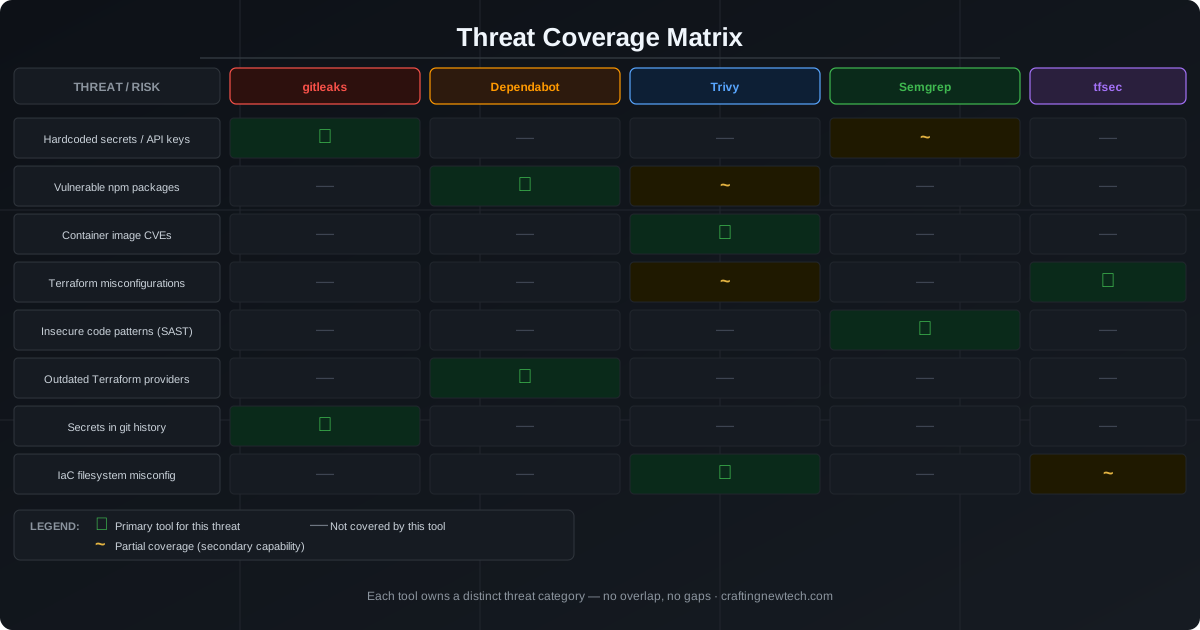
The matrix reveals the design principle: each tool owns exactly one threat category. There is no tool that does everything, and that is intentional. A single tool that claims to cover secrets, containers, IaC, and SAST will do none of them well. Specialized tools do their one job with high precision and low false-positive rates.
Wiring It All Into GitHub Actions
Here is a complete workflow that runs all five tools as required CI gates. Every job must pass before a deploy can proceed.
name: Security Gates

on:
  push:
    branches: [main]
  pull_request:
    branches: [main]

jobs:
  secrets:
    name: Secrets Scan (gitleaks)
    runs-on: ubuntu-latest
    steps:
      - uses: actions/checkout@v4
        with:
          fetch-depth: 0
      - name: Run gitleaks
        uses: gitleaks/gitleaks-action@v2
        env:
          GITHUB_TOKEN: ${{ secrets.GITHUB_TOKEN }}

  dependencies:
    name: Dependency Audit (npm audit)
    runs-on: ubuntu-latest
    steps:
      - uses: actions/checkout@v4
      - uses: actions/setup-node@v4
        with:
          node-version: 22
      - run: npm ci
        working-directory: ./website
      - run: npm audit --audit-level=high --omit=dev
        working-directory: ./website

  containers:
    name: Container Scan (Trivy)
    runs-on: ubuntu-latest
    steps:
      - uses: actions/checkout@v4
      - name: Build image
        run: docker build -t app:${{ github.sha }} .
      - name: Scan image
        uses: aquasecurity/trivy-action@master
        with:
          image-ref: 'app:${{ github.sha }}'
          severity: HIGH,CRITICAL
          ignore-unfixed: true
          exit-code: '1'

  sast:
    name: SAST (Semgrep)
    runs-on: ubuntu-latest
    container:
      image: semgrep/semgrep
    steps:
      - uses: actions/checkout@v4
      - run: semgrep scan --config=auto --error .

  iac:
    name: IaC Scan (tfsec)
    runs-on: ubuntu-latest
    steps:
      - uses: actions/checkout@v4
      - uses: aquasecurity/tfsec-action@v1.0.0
        with:
          working_directory: ./terraform
          additional_args: --minimum-severity HIGH

  deploy:
    name: Deploy
    needs: [secrets, dependencies, containers, sast, iac]
    runs-on: ubuntu-latest
    if: github.ref == 'refs/heads/main'
    steps:
      - run: echo "All security gates passed. Deploying."
With needs: [secrets, dependencies, containers, sast, iac] on the deploy job, GitHub enforces that every gate must show a green checkmark before the deployment step is allowed to start. A single failure anywhere in the chain stops the pipeline.
Local Pre-Push Checklist
CI gates catch things, but feedback in CI takes minutes. Running tools locally before pushing tightens the loop to seconds.
# From the repo root
cd website

# 1. Check for secrets
gitleaks detect --source .. --verbose

# 2. Audit npm dependencies
npm audit --audit-level=high --omit=dev

# 3. Scan Terraform IaC
trivy config ../terraform

# 4. SAST on source
semgrep scan --config=auto ../website/src

# If all pass, push
cd .. && git push origin main
I keep these as a mental checklist — or you can script them into a make check target that the global Claude instructions require before every push:
.PHONY: check
check:
    cd website && npm audit --audit-level=high --omit=dev
    trivy config terraform/
    semgrep scan --config=auto website/src/
    gitleaks detect --source . --verbose
Tuning Each Tool
Every scanner generates some noise. Here is how to manage it without disabling useful rules.
gitleaks — create .gitleaks.toml:
[[allowlist]]
description = "Test fixture dummy credentials"
paths = ["tests/fixtures/", "docs/examples/"]
npm audit — if a vulnerability is in a transitive dependency with no upstream fix, add a note in your tracking system and re-audit after 30 days. Do not suppress without a documented plan to revisit.
Trivy — use --ignore-unfixed in CI (unfixed CVEs have no action for you to take). For specific accepted risks, create a .trivyignore file listing CVE IDs with an expiry date in a comment.
Semgrep — add # nosemgrep: rule-id inline comments for intentional exceptions. The comment is tracked in code review so exceptions are visible.
tfsec — use terraform/.tfsec/config.yml to suppress rules that do not apply to your context, with a reason comment for each suppression (already covered in a previous article on this site).
What This Stack Does Not Cover
Being honest about the gaps that remain:
- Runtime threat detection — all five tools run at build time. Runtime anomalies (unexpected network connections, process injection) require a different class of tool (Falco, GuardDuty).
- DAST (dynamic analysis) — testing a live running app for vulnerabilities. Consider OWASP ZAP for endpoints that accept untrusted input.
- License compliance — if you ship commercial software, tools like FOSSA or
license-checkerverify that open-source licenses in your dependencies are compatible with your product license. - Supply chain attacks — a malicious package that passes all CVE checks because the vulnerability has not been reported yet. Lockfiles (
package-lock.json,terraform.lock.hcl) limit your exposure by pinning exact versions.
Summary
| Tool | Threat | When |
|---|---|---|
| gitleaks | Hardcoded secrets / credentials | Pre-commit + CI |
| Dependabot | Outdated vulnerable packages | Continuous (automated PRs) |
| npm audit | Known CVEs in production deps | Local + CI gate |
| Trivy | Container image CVEs + IaC | Local + CI gate |
| Semgrep | Insecure code patterns (SAST) | Local + CI |
| tfsec | Terraform misconfigurations | CI gate (existing) |
The pipeline already blocked bad infrastructure. Now it also blocks bad secrets, bad packages, bad images, and bad code. Six tools, six threat categories, zero overlap.
The first tool to add if you are starting from scratch: gitleaks. A secret in git history is the hardest class of vulnerability to remediate because you cannot delete history without rewriting it and rotating every credential that was ever exposed. Preventing it is vastly cheaper than cleaning it up.