Terraform IaC Pipeline with GitHub Actions: A Production-Grade Guide
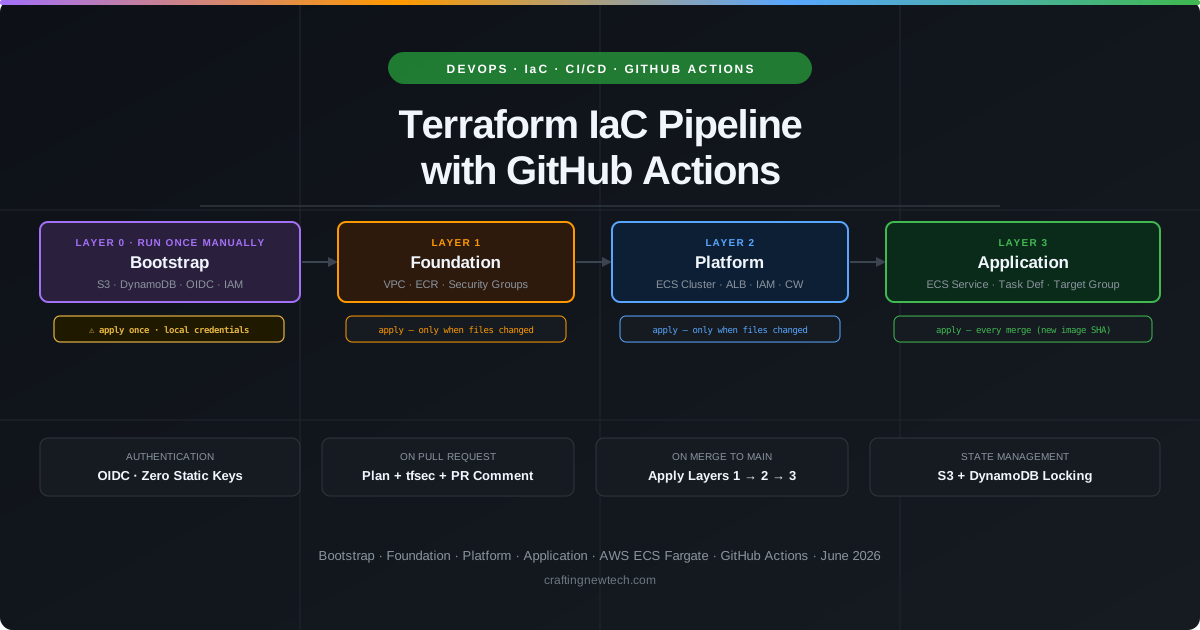
Building a Terraform pipeline sounds straightforward until you hit the first real problem: the backend doesn’t exist yet. Before GitHub Actions can run a single terraform apply, someone needs to create the S3 bucket that stores state and the DynamoDB table that provides locking — but those resources are created by Terraform itself. Welcome to the chicken-and-egg problem.
This guide works through a production-grade setup from the ground up: solving the bootstrap problem first, then building the multi-layer infrastructure, wiring up the GitHub Actions workflows, and shipping a containerized application to AWS ECS Fargate. Every section includes the actual code.
Overview and Philosophy
Three pillars make an IaC pipeline maintainable at production scale:
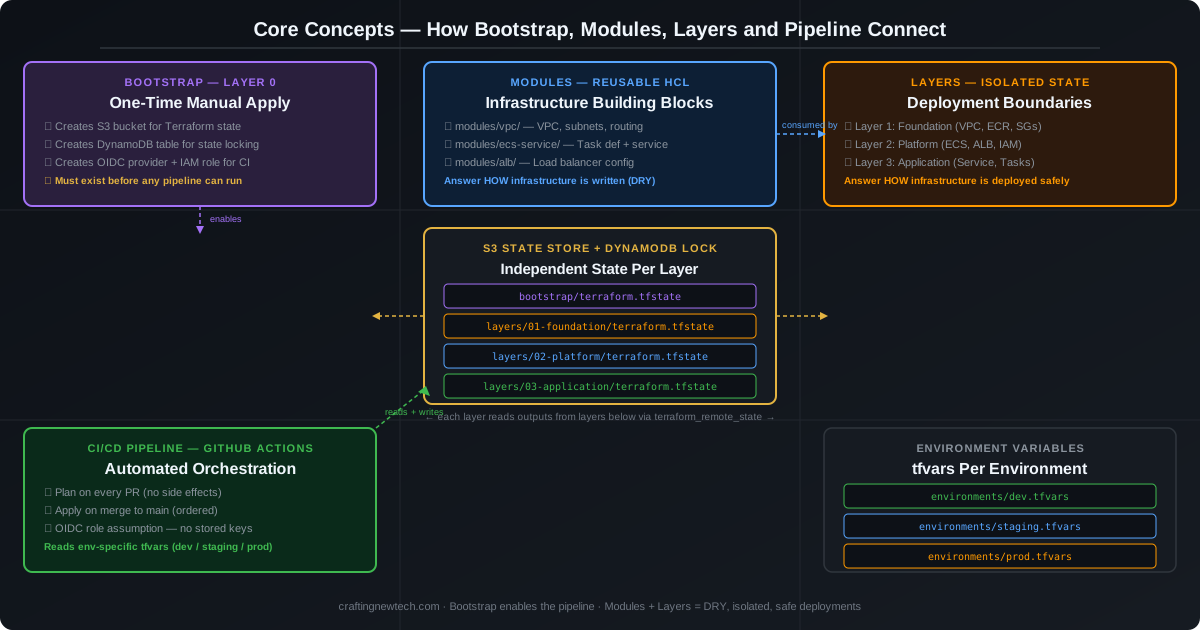
- Bootstrap — The one-time Layer 0 that creates the state backend and OIDC identity before any automation exists. Must be applied manually, once, before the pipeline can run.
- Layers — Isolated state boundaries that limit blast radius and enforce deployment order. A change to the application layer cannot accidentally destroy the VPC.
- Modules — Reusable HCL components that answer how infrastructure is written. Layers answer how it is deployed safely.
The practical recommendation from experienced engineers and the broader community is: use both, and never substitute one for the other. Modules keep your code DRY across layers. Layers keep your deployments safe from each other. A project with great modules but a single monolithic state is fragile at scale. A project with well-isolated layers but no modules will drift into copy-paste inconsistency across environments.
Repository Structure
A clean layout separates concerns from day one. Layers are numbered to make deployment order explicit. Modules live independently and are versioned through Git tags.
repo-root/
├── .github/
│   └── workflows/
│       ├── terraform-plan.yml       # Runs on every PR
│       └── terraform-apply.yml      # Runs on merge to main
│
├── bootstrap/                       # ⚠️  Layer 0 — Run ONCE manually
│   ├── main.tf
│   ├── backend.tf                   # Added AFTER first apply
│   ├── outputs.tf
│   └── variables.tf
│
├── layers/
│   ├── 01-foundation/               # VPC, ECR, Security Groups
│   │   ├── main.tf
│   │   ├── backend.tf
│   │   ├── variables.tf
│   │   └── outputs.tf
│   ├── 02-platform/                 # ECS Cluster, ALB, IAM
│   │   ├── main.tf
│   │   ├── backend.tf
│   │   ├── variables.tf
│   │   └── outputs.tf
│   └── 03-application/              # ECS Service, Task Definition
│       ├── main.tf
│       ├── backend.tf
│       ├── variables.tf
│       └── outputs.tf
│
├── modules/                         # Reusable child modules
│   ├── vpc/
│   ├── ecs-service/
│   ├── alb/
│   └── iam-role/
│
├── environments/
│   ├── dev.tfvars
│   ├── staging.tfvars
│   └── prod.tfvars
│
├── app/                             # The containerized application
│   ├── Dockerfile
│   └── src/
│
└── Makefile                         # Local helper commands
Core Concepts at a Glance
The Bootstrap Problem — Layer 0
This is the most critical section. Everything else depends on getting this right the first time.
Terraform stores its state in a remote backend — an S3 bucket and DynamoDB lock table on AWS. But to create that S3 bucket and DynamoDB table, you need to run Terraform, which itself requires a backend. The backend must exist before CI/CD can run.
This cannot be solved by modules alone. The bootstrap is always resolved at the layer boundary: apply Layer 0 manually, once, before any pipeline exists.
The Three Accepted Approaches
| Approach | When to Use | Trade-offs |
|---|---|---|
| Dedicated Bootstrap Module (recommended) | Most teams | Two-init cycle, clean, fully repeatable |
| External Tool (CloudFormation, AWS CLI) | Regulated/enterprise environments | Clean separation, no Terraform workarounds |
| Automated Provisioning (Atmos/Terragrunt) | Platform teams at scale | Tooling dependency, eliminates manual step |
Step 1 — Write the bootstrap module (no backend block yet)
bootstrap/variables.tf
variable "aws_region"   { default = "us-east-1" }
variable "project_name" { description = "Short project slug, e.g. myapp" }
variable "account_id"   { description = "AWS account ID (for bucket name uniqueness)" }
variable "github_org"   { description = "GitHub org or username" }
variable "github_repo"  { description = "GitHub repository name" }
bootstrap/outputs.tf
output "state_bucket_name" { value = aws_s3_bucket.terraform_state.bucket }
output "lock_table_name"   { value = aws_dynamodb_table.terraform_locks.name }
output "github_role_arn"   { value = aws_iam_role.github_actions.arn }
bootstrap/main.tf — S3 bucket, DynamoDB lock table, OIDC provider, IAM role
Show bootstrap/main.tf (~115 lines)
# bootstrap/main.tf

terraform {
  required_version = ">= 1.5.0"
  required_providers {
    aws = {
      source  = "hashicorp/aws"
      version = "~> 5.0"
    }
  }
  # ⚠️ NO backend block — we are creating it
}

provider "aws" {
  region = var.aws_region
}

# --- S3 bucket for Terraform state ---
resource "aws_s3_bucket" "terraform_state" {
  bucket = "${var.project_name}-terraform-state-${var.account_id}"

  lifecycle {
    prevent_destroy = true
  }

  tags = {
    Name        = "Terraform State"
    ManagedBy   = "terraform-bootstrap"
    Environment = "global"
  }
}

resource "aws_s3_bucket_versioning" "terraform_state" {
  bucket = aws_s3_bucket.terraform_state.id
  versioning_configuration {
    status = "Enabled"
  }
}

resource "aws_s3_bucket_server_side_encryption_configuration" "terraform_state" {
  bucket = aws_s3_bucket.terraform_state.id
  rule {
    apply_server_side_encryption_by_default {
      sse_algorithm = "AES256"
    }
  }
}

resource "aws_s3_bucket_public_access_block" "terraform_state" {
  bucket                  = aws_s3_bucket.terraform_state.id
  block_public_acls       = true
  block_public_policy     = true
  ignore_public_acls      = true
  restrict_public_buckets = true
}

# --- DynamoDB table for state locking ---
resource "aws_dynamodb_table" "terraform_locks" {
  name         = "${var.project_name}-terraform-locks"
  billing_mode = "PAY_PER_REQUEST"
  hash_key     = "LockID"

  attribute {
    name = "LockID"
    type = "S"
  }

  tags = {
    Name      = "Terraform State Locks"
    ManagedBy = "terraform-bootstrap"
  }
}

# --- OIDC Provider for GitHub Actions (no long-lived AWS keys) ---
resource "aws_iam_openid_connect_provider" "github_actions" {
  url = "https://token.actions.githubusercontent.com"

  client_id_list = ["sts.amazonaws.com"]

  thumbprint_list = [
    "6938fd4d98bab03faadb97b34396831e3780aea1",
    "1c58a3a8518e8759bf075b76b750d4f2df264fcd"
  ]
}

# --- IAM Role for GitHub Actions to assume ---
resource "aws_iam_role" "github_actions" {
  name = "${var.project_name}-github-actions-role"

  assume_role_policy = jsonencode({
    Version = "2012-10-17"
    Statement = [{
      Effect = "Allow"
      Principal = {
        Federated = aws_iam_openid_connect_provider.github_actions.arn
      }
      Action = "sts:AssumeRoleWithWebIdentity"
      Condition = {
        StringLike = {
          "token.actions.githubusercontent.com:sub" = "repo:${var.github_org}/${var.github_repo}:*"
        }
        StringEquals = {
          "token.actions.githubusercontent.com:aud" = "sts.amazonaws.com"
        }
      }
    }]
  })
}

resource "aws_iam_role_policy_attachment" "github_actions" {
  role       = aws_iam_role.github_actions.name
  policy_arn = "arn:aws:iam::aws:policy/PowerUserAccess"  # Scope down in Phase 5
}
Step 2 — Apply bootstrap locally (first and only manual apply)
cd bootstrap/

# Configure AWS credentials locally (one-time only)
export AWS_PROFILE=your-admin-profile

terraform init          # Uses local state — no backend block exists yet
terraform plan          # Review: S3 bucket, DynamoDB, OIDC provider, IAM role
terraform apply         # Creates all resources; terraform.tfstate written locally

# Save all outputs — you need them for the next steps
terraform output
Step 3 — Add backend block and migrate local state to S3
Create bootstrap/backend.tf (this file should not exist until after the apply above):
# bootstrap/backend.tf — create this file AFTER the initial apply

terraform {
  backend "s3" {
    bucket         = "myapp-terraform-state-123456789"   # from terraform output
    key            = "bootstrap/terraform.tfstate"
    region         = "us-east-1"
    dynamodb_table = "myapp-terraform-locks"             # from terraform output
    encrypt        = true
  }
}
# Re-init — Terraform detects the new backend and offers to migrate local state
terraform init
# Terraform prompt: "Do you want to copy existing state to the new backend? (yes/no)"
# → Type: yes
# Verify state is now remote
terraform state list
# Delete local state — it is now in S3
rm terraform.tfstate terraform.tfstate.backupStep 4 — Add GitHub Actions secrets
In GitHub → Settings → Secrets and Variables → Actions, add:
AWS_ROLE_ARN      = arn:aws:iam::123456789:role/myapp-github-actions-role
AWS_REGION        = us-east-1
TF_STATE_BUCKET   = myapp-terraform-state-123456789
TF_LOCK_TABLE     = myapp-terraform-locks
✅ Bootstrap is complete. From this point forward, no human runs
terraform applymanually. The pipeline takes over.
Terraform Layers and Modules Design
Layer Dependency Rule
Layers communicate exclusively through terraform_remote_state data sources. A layer may only read state from layers below it — never above.
Layer 0: Bootstrap    → Creates: S3, DynamoDB, OIDC, IAM
    ↓
Layer 1: Foundation   → Creates: VPC, Subnets, ECR, Security Groups
    ↓                   Reads: nothing (it's the base)
Layer 2: Platform     → Creates: ECS Cluster, ALB, IAM Roles, CloudWatch
    ↓                   Reads: Layer 1 (VPC IDs, Security Group IDs)
Layer 3: Application  → Creates: ECS Service, Task Definition, Target Group
                        Reads: Layer 1 (VPC), Layer 2 (Cluster ARN, ALB ARN)
Cross-Layer Data Access Pattern
# layers/02-platform/main.tf — reading Layer 1 outputs

data "terraform_remote_state" "foundation" {
  backend = "s3"
  config = {
    bucket = var.state_bucket
    key    = "layers/01-foundation/terraform.tfstate"
    region = var.aws_region
  }
}

locals {
  vpc_id             = data.terraform_remote_state.foundation.outputs.vpc_id
  private_subnet_ids = data.terraform_remote_state.foundation.outputs.private_subnet_ids
  alb_sg_id          = data.terraform_remote_state.foundation.outputs.alb_security_group_id
}
Module Design Principle
Modules are the reusable building blocks consumed by layers. A module should do one thing.
modules/ecs-service/
├── main.tf       # ECS Task Definition + Service resource
├── variables.tf  # image_uri, cpu, memory, container_port, etc.
├── outputs.tf    # service_name, task_definition_arn
└── README.md     # Usage example — required
The Example Application
A minimal Node.js HTTP API containerized with Docker. This represents any application you would deploy.
// app/src/index.js

const http = require('http');
const PORT = process.env.PORT || 3000;
const ENV  = process.env.APP_ENV || 'development';

const server = http.createServer((req, res) => {
  if (req.url === '/health') {
    res.writeHead(200, { 'Content-Type': 'application/json' });
    res.end(JSON.stringify({ status: 'ok', env: ENV }));
    return;
  }
  res.writeHead(200, { 'Content-Type': 'application/json' });
  res.end(JSON.stringify({
    message: 'Hello from the IaC pipeline!',
    env: ENV,
    version: process.env.APP_VERSION || 'unknown'
  }));
});

server.listen(PORT, () => {
  console.log(`Server running on port ${PORT} in ${ENV} mode`);
});
# app/Dockerfile
FROM node:20-alpine AS builder
WORKDIR /app
COPY package*.json ./
RUN npm ci --only=production
FROM node:20-alpine AS runtime
WORKDIR /app
# Security: run as non-root
RUN addgroup -S appgroup && adduser -S appuser -G appgroup
COPY --from=builder /app/node_modules ./node_modules
COPY src/ ./src/
USER appuser
EXPOSE 3000
HEALTHCHECK --interval=30s --timeout=3s --start-period=5s --retries=3 \
CMD wget -qO- http://localhost:3000/health || exit 1
CMD ["node", "src/index.js"]GitHub Actions Pipeline Flow
GitHub Actions Pipeline Flow
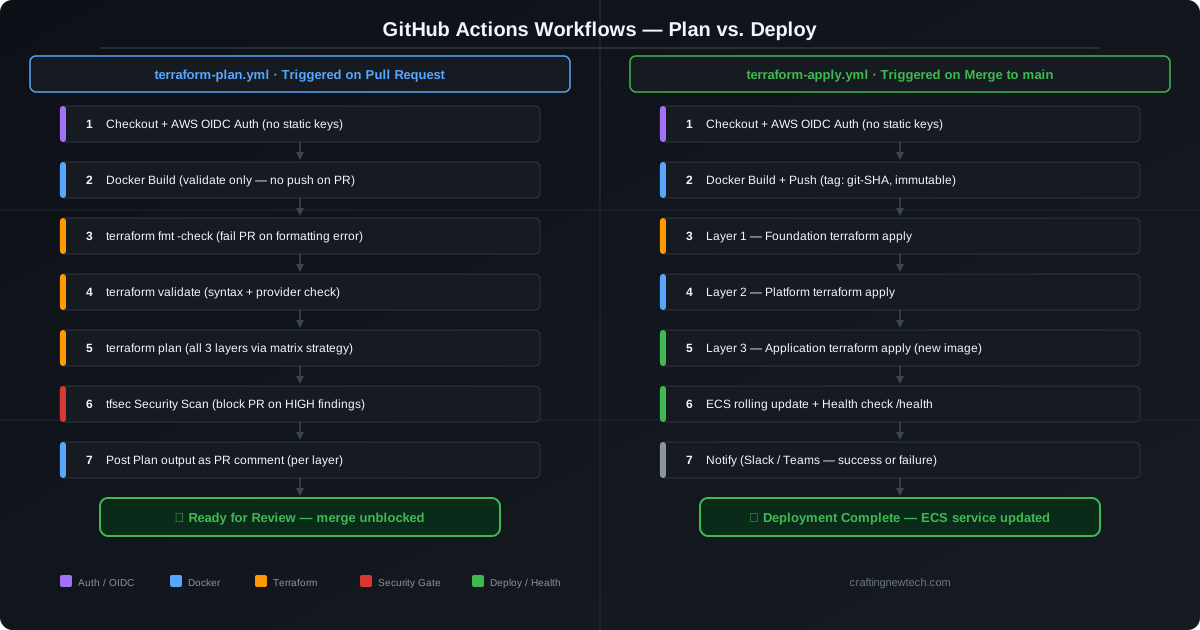
Two workflows handle the full lifecycle — one for safety, one for delivery.
Workflow 1: terraform-plan.yml — Every Pull Request
| Step | Action |
|---|---|
| Checkout | Clone the repository |
| AWS Auth | Assume IAM role via OIDC — no static keys |
| Docker Build | Build image, validate it builds (no push on PR) |
| terraform fmt | Fail the PR if formatting is wrong |
| terraform validate | Syntax and provider validation |
| terraform plan | Generate plan for all layers via matrix strategy |
| tfsec | Security scan — block on HIGH findings |
| PR Comment | Post the plan output as a PR comment per layer |
Workflow 2: terraform-apply.yml — Merge to main
| Step | Action |
|---|---|
| Checkout | Clone the repository |
| AWS Auth | Assume IAM role via OIDC |
| Docker Push | Build and push with git SHA tag (immutable) |
| Layer 1 Apply | Foundation — only if changed |
| Layer 2 Apply | Platform — only if changed |
| Layer 3 Apply | Application — always (new image SHA) |
| Health Check | HTTP check on /health endpoint post-deploy |
| Notify | Slack/Teams notification on success or failure |
Pipeline Flow Diagram
Full Pipeline Code
Workflow 1 — Plan on Pull Request
Show terraform-plan.yml (~125 lines)
# .github/workflows/terraform-plan.yml

name: Terraform Plan (PR)

on:
  pull_request:
    branches: [main]
    paths:
      - 'layers/**'
      - 'modules/**'
      - 'app/**'

permissions:
  id-token: write       # Required for OIDC
  contents: read
  pull-requests: write  # Required to post plan comments

env:
  TF_VERSION: "1.8.0"
  AWS_REGION: ${{ secrets.AWS_REGION }}

jobs:

  # ─── Build & validate Docker image ───────────────────────────────────────
  docker-build:
    name: Docker Build & Validate
    runs-on: ubuntu-latest
    steps:
      - uses: actions/checkout@v4

      - name: Log in to GHCR
        uses: docker/login-action@v3
        with:
          registry: ghcr.io
          username: ${{ github.actor }}
          password: ${{ secrets.GITHUB_TOKEN }}

      - name: Build image (validate only — no push on PR)
        run: |
          docker build \
            --build-arg APP_VERSION=pr-${{ github.sha }} \
            -t ghcr.io/${{ github.repository }}:pr-${{ github.sha }} \
            ./app

  # ─── Terraform checks per layer ──────────────────────────────────────────
  terraform-plan:
    name: Plan — ${{ matrix.layer }}
    runs-on: ubuntu-latest
    needs: docker-build
    strategy:
      matrix:
        layer: [01-foundation, 02-platform, 03-application]
      fail-fast: false

    steps:
      - uses: actions/checkout@v4

      - name: Configure AWS credentials (OIDC — no static keys)
        uses: aws-actions/configure-aws-credentials@v4
        with:
          role-to-assume: ${{ secrets.AWS_ROLE_ARN }}
          aws-region: ${{ env.AWS_REGION }}

      - name: Setup Terraform
        uses: hashicorp/setup-terraform@v3
        with:
          terraform_version: ${{ env.TF_VERSION }}

      - name: Terraform Format Check
        working-directory: layers/${{ matrix.layer }}
        run: terraform fmt -check -recursive

      - name: Terraform Init
        working-directory: layers/${{ matrix.layer }}
        run: |
          terraform init \
            -backend-config="bucket=${{ secrets.TF_STATE_BUCKET }}" \
            -backend-config="dynamodb_table=${{ secrets.TF_LOCK_TABLE }}" \
            -backend-config="region=${{ env.AWS_REGION }}"

      - name: Terraform Validate
        working-directory: layers/${{ matrix.layer }}
        run: terraform validate

      - name: Terraform Plan
        id: plan
        working-directory: layers/${{ matrix.layer }}
        run: |
          terraform plan \
            -var-file="../../environments/dev.tfvars" \
            -var="image_tag=pr-${{ github.sha }}" \
            -var="state_bucket=${{ secrets.TF_STATE_BUCKET }}" \
            -out=tfplan \
            -no-color 2>&1 | tee plan_output.txt

      - name: Post plan as PR comment
        uses: actions/github-script@v7
        with:
          script: |
            const fs = require('fs');
            const plan = fs.readFileSync('layers/${{ matrix.layer }}/plan_output.txt', 'utf8');
            const truncated = plan.length > 60000
              ? plan.substring(0, 60000) + '\n\n... [truncated]'
              : plan;
            github.rest.issues.createComment({
              issue_number: context.issue.number,
              owner: context.repo.owner,
              repo: context.repo.repo,
              body: `## Terraform Plan — \`${{ matrix.layer }}\`\n\`\`\`hcl\n${truncated}\n\`\`\``
            });

  # ─── Security scanning ───────────────────────────────────────────────────
  security-scan:
    name: Security Scan (tfsec)
    runs-on: ubuntu-latest
    steps:
      - uses: actions/checkout@v4

      - name: Run tfsec
        uses: aquasecurity/tfsec-action@v1.0.0
        with:
          additional_args: --minimum-severity HIGH
Workflow 2 — Apply on Merge to Main
Show terraform-apply.yml (~185 lines)
# .github/workflows/terraform-apply.yml

name: Terraform Apply (Deploy)

on:
  push:
    branches: [main]

permissions:
  id-token: write
  contents: read
  packages: write   # Push to GHCR

env:
  TF_VERSION: "1.8.0"
  AWS_REGION: ${{ secrets.AWS_REGION }}
  IMAGE_TAG: ${{ github.sha }}

jobs:

  # ─── Build and push Docker image ─────────────────────────────────────────
  build-and-push:
    name: Build & Push Docker Image
    runs-on: ubuntu-latest
    outputs:
      image_uri: ${{ steps.meta.outputs.tags }}
    steps:
      - uses: actions/checkout@v4

      - name: Log in to GHCR
        uses: docker/login-action@v3
        with:
          registry: ghcr.io
          username: ${{ github.actor }}
          password: ${{ secrets.GITHUB_TOKEN }}

      - name: Extract metadata
        id: meta
        uses: docker/metadata-action@v5
        with:
          images: ghcr.io/${{ github.repository }}
          tags: |
            type=sha,prefix=,format=short

      - name: Build and push
        uses: docker/build-push-action@v5
        with:
          context: ./app
          push: true
          tags: ${{ steps.meta.outputs.tags }}
          labels: ${{ steps.meta.outputs.labels }}
          build-args: |
            APP_VERSION=${{ github.sha }}

  # ─── Layer 1: Foundation ─────────────────────────────────────────────────
  deploy-foundation:
    name: Deploy Layer 1 — Foundation
    runs-on: ubuntu-latest
    needs: build-and-push
    environment: production
    steps:
      - uses: actions/checkout@v4

      - name: Configure AWS credentials
        uses: aws-actions/configure-aws-credentials@v4
        with:
          role-to-assume: ${{ secrets.AWS_ROLE_ARN }}
          aws-region: ${{ env.AWS_REGION }}

      - uses: hashicorp/setup-terraform@v3
        with:
          terraform_version: ${{ env.TF_VERSION }}

      - name: Terraform Init — Foundation
        working-directory: layers/01-foundation
        run: |
          terraform init \
            -backend-config="bucket=${{ secrets.TF_STATE_BUCKET }}" \
            -backend-config="dynamodb_table=${{ secrets.TF_LOCK_TABLE }}" \
            -backend-config="region=${{ env.AWS_REGION }}"

      - name: Terraform Apply — Foundation
        working-directory: layers/01-foundation
        run: |
          terraform apply \
            -var-file="../../environments/prod.tfvars" \
            -var="state_bucket=${{ secrets.TF_STATE_BUCKET }}" \
            -auto-approve

  # ─── Layer 2: Platform ───────────────────────────────────────────────────
  deploy-platform:
    name: Deploy Layer 2 — Platform
    runs-on: ubuntu-latest
    needs: deploy-foundation
    environment: production
    steps:
      - uses: actions/checkout@v4

      - name: Configure AWS credentials
        uses: aws-actions/configure-aws-credentials@v4
        with:
          role-to-assume: ${{ secrets.AWS_ROLE_ARN }}
          aws-region: ${{ env.AWS_REGION }}

      - uses: hashicorp/setup-terraform@v3
        with:
          terraform_version: ${{ env.TF_VERSION }}

      - name: Terraform Init — Platform
        working-directory: layers/02-platform
        run: |
          terraform init \
            -backend-config="bucket=${{ secrets.TF_STATE_BUCKET }}" \
            -backend-config="dynamodb_table=${{ secrets.TF_LOCK_TABLE }}" \
            -backend-config="region=${{ env.AWS_REGION }}"

      - name: Terraform Apply — Platform
        working-directory: layers/02-platform
        run: |
          terraform apply \
            -var-file="../../environments/prod.tfvars" \
            -var="state_bucket=${{ secrets.TF_STATE_BUCKET }}" \
            -auto-approve

  # ─── Layer 3: Application ────────────────────────────────────────────────
  deploy-application:
    name: Deploy Layer 3 — Application
    runs-on: ubuntu-latest
    needs: deploy-platform
    environment: production
    steps:
      - uses: actions/checkout@v4

      - name: Configure AWS credentials
        uses: aws-actions/configure-aws-credentials@v4
        with:
          role-to-assume: ${{ secrets.AWS_ROLE_ARN }}
          aws-region: ${{ env.AWS_REGION }}

      - uses: hashicorp/setup-terraform@v3
        with:
          terraform_version: ${{ env.TF_VERSION }}

      - name: Terraform Init — Application
        working-directory: layers/03-application
        run: |
          terraform init \
            -backend-config="bucket=${{ secrets.TF_STATE_BUCKET }}" \
            -backend-config="dynamodb_table=${{ secrets.TF_LOCK_TABLE }}" \
            -backend-config="region=${{ env.AWS_REGION }}"

      - name: Terraform Apply — Application
        working-directory: layers/03-application
        run: |
          terraform apply \
            -var-file="../../environments/prod.tfvars" \
            -var="image_tag=${{ env.IMAGE_TAG }}" \
            -var="state_bucket=${{ secrets.TF_STATE_BUCKET }}" \
            -auto-approve

  # ─── Health check ────────────────────────────────────────────────────────
  health-check:
    name: Post-Deploy Health Check
    runs-on: ubuntu-latest
    needs: deploy-application
    steps:
      - name: Wait for ECS stabilization
        run: sleep 30

      - name: Health check
        run: |
          ENDPOINT=${{ secrets.ALB_ENDPOINT }}
          for i in {1..10}; do
            STATUS=$(curl -s -o /dev/null -w "%{http_code}" http://${ENDPOINT}/health)
            if [ "$STATUS" = "200" ]; then
              echo "Health check passed"
              exit 0
            fi
            echo "Attempt $i: got $STATUS, retrying in 15s..."
            sleep 15
          done
          echo "Health check failed after 10 attempts"
          exit 1
Terraform Code by Layer
Backend Configuration (each layer)
Every layer uses the same pattern. The bucket and table are injected at runtime via -backend-config in CI — no hardcoded bucket names in the repository.
# layers/01-foundation/backend.tf
# (same pattern for layers 02 and 03, only the key changes)

terraform {
  backend "s3" {
    # bucket, dynamodb_table, and region are injected at runtime via -backend-config
    key     = "layers/01-foundation/terraform.tfstate"
    encrypt = true
  }
}
Cross-Layer remote_state Pattern
# layers/03-application/main.tf — reads from both Layer 1 and Layer 2

data "terraform_remote_state" "foundation" {
  backend = "s3"
  config = {
    bucket = var.state_bucket
    key    = "layers/01-foundation/terraform.tfstate"
    region = var.aws_region
  }
}

data "terraform_remote_state" "platform" {
  backend = "s3"
  config = {
    bucket = var.state_bucket
    key    = "layers/02-platform/terraform.tfstate"
    region = var.aws_region
  }
}
Layer 1 — Foundation (VPC + ECR + Security Groups)
Show layers/01-foundation/main.tf
# layers/01-foundation/main.tf

terraform {
  required_version = ">= 1.5.0"
  required_providers {
    aws = { source = "hashicorp/aws", version = "~> 5.0" }
  }
}

provider "aws" {
  region = var.aws_region
}

module "vpc" {
  source = "../../modules/vpc"

  name               = "${var.project_name}-${var.environment}"
  cidr               = var.vpc_cidr
  availability_zones = var.availability_zones
  private_subnets    = var.private_subnets
  public_subnets     = var.public_subnets

  tags = local.common_tags
}

resource "aws_ecr_repository" "app" {
  name                 = "${var.project_name}/${var.app_name}"
  image_tag_mutability = "IMMUTABLE"

  image_scanning_configuration {
    scan_on_push = true
  }

  tags = local.common_tags
}

resource "aws_security_group" "alb" {
  name        = "${var.project_name}-alb-sg"
  description = "ALB security group"
  vpc_id      = module.vpc.vpc_id

  ingress {
    from_port   = 80
    to_port     = 80
    protocol    = "tcp"
    cidr_blocks = ["0.0.0.0/0"]
  }

  egress {
    from_port   = 0
    to_port     = 0
    protocol    = "-1"
    cidr_blocks = ["0.0.0.0/0"]
  }

  tags = local.common_tags
}

resource "aws_security_group" "ecs_tasks" {
  name        = "${var.project_name}-ecs-tasks-sg"
  description = "ECS tasks security group"
  vpc_id      = module.vpc.vpc_id

  ingress {
    from_port       = var.container_port
    to_port         = var.container_port
    protocol        = "tcp"
    security_groups = [aws_security_group.alb.id]
  }

  egress {
    from_port   = 0
    to_port     = 0
    protocol    = "-1"
    cidr_blocks = ["0.0.0.0/0"]
  }

  tags = local.common_tags
}

locals {
  common_tags = {
    Project     = var.project_name
    Environment = var.environment
    ManagedBy   = "terraform"
    Layer       = "01-foundation"
  }
}
Layer 3 — Application (ECS Service via reusable module)
Show layers/03-application/main.tf
# layers/03-application/main.tf

data "terraform_remote_state" "foundation" {
  backend = "s3"
  config = {
    bucket = var.state_bucket
    key    = "layers/01-foundation/terraform.tfstate"
    region = var.aws_region
  }
}

data "terraform_remote_state" "platform" {
  backend = "s3"
  config = {
    bucket = var.state_bucket
    key    = "layers/02-platform/terraform.tfstate"
    region = var.aws_region
  }
}

module "app_service" {
  source = "../../modules/ecs-service"

  name           = var.project_name
  environment    = var.environment
  cluster_arn    = data.terraform_remote_state.platform.outputs.ecs_cluster_arn
  image_uri      = "ghcr.io/${var.github_repo}:${var.image_tag}"
  container_port = var.container_port
  cpu            = var.task_cpu
  memory         = var.task_memory
  desired_count  = var.desired_count

  vpc_id           = data.terraform_remote_state.foundation.outputs.vpc_id
  subnet_ids       = data.terraform_remote_state.foundation.outputs.private_subnet_ids
  security_groups  = [data.terraform_remote_state.foundation.outputs.ecs_tasks_sg_id]
  target_group_arn = data.terraform_remote_state.platform.outputs.target_group_arn

  environment_variables = {
    APP_ENV     = var.environment
    APP_VERSION = var.image_tag
  }

  tags = {
    Project     = var.project_name
    Environment = var.environment
    ManagedBy   = "terraform"
    Layer       = "03-application"
    ImageTag    = var.image_tag
  }
}
Security Best Practices
Security Best Practices
| Practice | Implementation |
|---|---|
| No static AWS keys | GitHub Actions assumes IAM role via OIDC |
| Least-privilege IAM | Scoped IAM policy per layer — scope down from PowerUserAccess in Phase 5 |
| State encryption | S3 SSE-AES256 + bucket policy denying HTTP |
| State access control | Per-layer IAM conditions on S3 key prefix |
| No secrets in code | All secrets via GitHub Secrets → injected at runtime |
| Immutable image tags | ECR image_tag_mutability = "IMMUTABLE" — tagged by git SHA |
| Non-root container | Dockerfile: USER appuser |
| Lock provider versions | Commit .terraform.lock.hcl to git |
| Scan on every PR | tfsec blocks HIGH findings before merge |
| State locking | DynamoDB prevents concurrent applies |
prevent_destroy | On S3 state bucket and core data resources |
Action and Deployment Plan
Phase 0 — Prerequisites (Day 1)
- Create AWS account or dedicated sub-account for this workload
- Create a local AWS CLI profile with admin access (temporary — for bootstrap only)
- Create the GitHub repository
- Install Terraform >= 1.5.0 locally
- Install
tfsecandcheckovCLI tools locally
Phase 1 — Bootstrap (Day 1–2) ⚠️ Most Critical Phase
- Write
bootstrap/module (S3, DynamoDB, OIDC provider, IAM role) - Run
terraform initlocally (no backend yet) - Run
terraform planand review all resources to be created - Run
terraform apply— creates backend infrastructure - Note all output values (bucket name, table name, role ARN)
- Create
bootstrap/backend.tfpointing at the new bucket - Run
terraform init— confirm migration prompt — typeyes - Delete local
terraform.tfstatefiles - Add
AWS_ROLE_ARN,TF_STATE_BUCKET,TF_LOCK_TABLE,AWS_REGIONto GitHub Secrets - Verify OIDC trust by triggering a test workflow that runs
aws sts get-caller-identity
Phase 2 — Foundation Layer (Day 2–3)
- Write
modules/vpc/with VPC, subnets, IGW, route tables - Write
layers/01-foundation/consuming the vpc module - Add ECR repository and security group resources
- Add
backend.tfwith the correct state key - Test locally:
terraform plan -var-file=../../environments/dev.tfvars - Open PR → confirm plan workflow runs and posts comment
- Merge → confirm apply workflow runs successfully
- Verify VPC, ECR, and security groups in the AWS Console
Phase 3 — Platform Layer (Day 3–4)
- Write
modules/alb/andmodules/iam-role/ - Write
layers/02-platform/consuming modules and reading Layer 1 remote state - Add ECS cluster, ALB, target group, CloudWatch log group
- Test locally with
terraform_remote_statepointing to dev state - PR → plan → merge → apply
- Verify ECS cluster and ALB in the AWS Console
Phase 4 — Application Layer and Docker (Day 4–5)
- Write
app/(Dockerfile and application code) - Write
modules/ecs-service/(task definition and service) - Write
layers/03-application/reading Layers 1 and 2 remote state - Test Docker build locally:
docker build ./app && docker run -p 3000:3000 - PR → plan → merge → full pipeline run
- Verify ECS service is running and ALB returns 200
Phase 5 — Hardening (Day 5–7)
- Scope down IAM role from
PowerUserAccessto a least-privilege policy - Enable S3 bucket access logging on the state bucket
- Add
prevent_destroyto critical resources - Add a staging environment and test the promotion flow
- Write a runbook: what to do if state is corrupted or the pipeline is stuck
Phase 6 — Ongoing Operations
- Set up a nightly
terraform plandrift detection workflow - Pin Terraform and provider versions; schedule quarterly updates
- Review tfsec/Checkov results weekly
- Document module changes with semantic versioning in git tags
Checklists
Bootstrap Checklist (never skip these)
[ ] S3 bucket has versioning enabled
[ ] S3 bucket has server-side encryption
[ ] S3 bucket blocks all public access
[ ] DynamoDB table has LockID hash key
[ ] OIDC provider thumbprints are current
[ ] IAM role trust policy scoped to this repo only (not *)
[ ] Local terraform.tfstate deleted after migration
[ ] GitHub Secrets set: AWS_ROLE_ARN, TF_STATE_BUCKET, TF_LOCK_TABLE, AWS_REGION
[ ] OIDC auth verified with a manual workflow before writing any layer code
Pipeline Checklist
[ ] .terraform.lock.hcl committed to git (pinned providers)
[ ] backend.tf uses -backend-config injection (no hardcoded bucket names)
[ ] All layers use separate state keys
[ ] terraform_remote_state used for cross-layer data (never hardcoded IDs)
[ ] tfsec blocks on HIGH findings
[ ] image_tag always set to git SHA (never "latest")
[ ] ECR image_tag_mutability = "IMMUTABLE"
[ ] Container runs as non-root user
[ ] Health check endpoint implemented and tested
[ ] ECS deployment circuit breaker enabled (auto-rollback on failure)