AI Slack Bot Agent
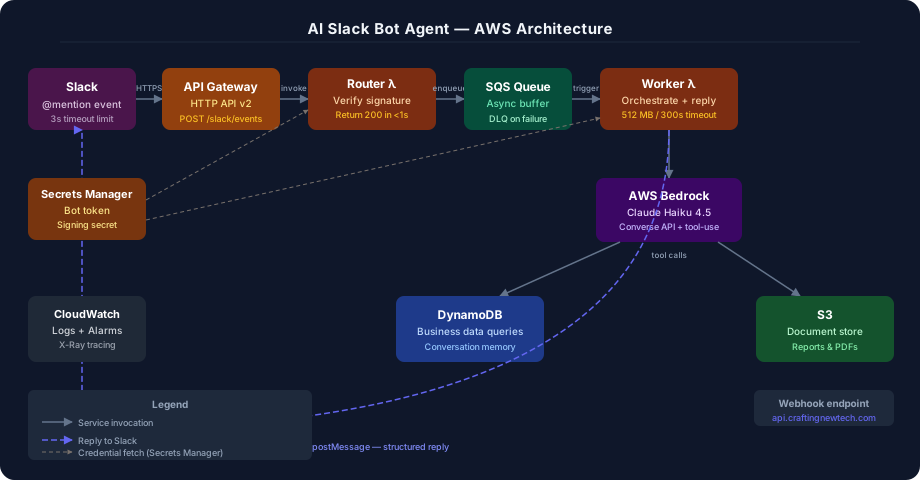
A serverless AI agent on AWS that receives natural language questions via Slack, reasons using AWS Bedrock (Claude Haiku), calls real AWS tools — DynamoDB, S3, web search — and posts structured answers back to the channel.
How it works
A user types @docsbot in Slack with a natural language question. API Gateway receives the webhook and passes it to the Router Lambda, which validates the Slack signature, returns HTTP 200 immediately (solving Slack’s 3-second timeout), and enqueues the job to SQS.
The Worker Lambda picks up the message, calls AWS Bedrock with the user’s question, and lets Claude Haiku decide which tools to invoke — querying DynamoDB for structured business data, reading documents from S3, or using previous conversation history. The final answer is posted back to Slack as a structured reply.
Services used
Compute
| Service | Role |
|---|---|
| Lambda — router | Receives Slack event, validates signature, returns 200 OK instantly, enqueues job |
| Lambda — worker | Reads SQS, calls Bedrock, executes tool calls, posts reply to Slack |
AI & agent
| Service | Role |
|---|---|
| AWS Bedrock | Hosts Claude Haiku model — handles reasoning and tool-use decisions |
| Bedrock tool use | Agent decides which tools to call and in what order based on the question |
API & messaging
| Service | Role |
|---|---|
| API Gateway | Public HTTPS endpoint that Slack posts events to |
| SQS queue | Decouples router from worker — solves the Slack 3-second timeout problem |
| SQS DLQ | Dead-letter queue captures failed jobs for inspection and retry |
Data & storage
| Service | Role |
|---|---|
| DynamoDB — conversations | Stores message history per user so agent has memory across turns |
| DynamoDB — business data | Stores queryable structured data (e.g. sales reps, products) for agent tools |
| S3 — documents | Stores PDFs and reports the agent summarizer tool reads |
| S3 — Terraform state | Remote backend for Terraform state files |
Security & config
| Service | Role |
|---|---|
| Secrets Manager | Stores Slack bot token and signing secret — never in env vars |
| IAM roles | Separate least-privilege role per Lambda — no shared credentials |
| VPC + private subnets | Lambda runs in private subnet — no public internet exposure |
| KMS | Encryption at rest for DynamoDB and S3 |
Observability
| Service | Role |
|---|---|
| CloudWatch Logs | Captures all Lambda stdout — structured JSON logging |
| X-Ray tracing | Traces the full agent reasoning chain — shows each tool call as a span |
| CloudWatch Alarms | Alerts on DLQ depth > 0 and Lambda error rate > 5% |
CI/CD pipeline
| Service | Role |
|---|---|
| CodeCommit | Git source repository with branch protection on main |
| CodePipeline | Orchestrates: source → build → terraform plan → approval → terraform apply |
| CodeBuild | Runs terraform fmt, terraform validate, tfsec, checkov, unit tests |
| Manual approval gate | Required between terraform plan and terraform apply for prod |
Key design decisions
Two-Lambda pattern — Router Lambda returns HTTP 200 to Slack within 3 seconds, enqueues the job to SQS. Worker Lambda processes asynchronously with no time pressure. This solves Slack’s strict acknowledgment timeout.
Bedrock over direct API calls — All AI requests stay inside the AWS network. Bedrock does not store or train on your prompts. Better data governance than calling Anthropic or OpenAI APIs directly.
DynamoDB on-demand — No minimum capacity cost. At portfolio-scale traffic the database cost is effectively zero. Scales automatically if traffic spikes.
Least-privilege IAM — Each Lambda has its own role with only the permissions it needs. Router Lambda can only write to SQS and read Secrets Manager. Worker Lambda can read SQS, call Bedrock, read/write DynamoDB, read S3, and call Slack’s API. Nothing more.
Signing secret validation — Every incoming Slack request is verified using HMAC-SHA256 against the Slack signing secret before any processing begins. Random HTTP requests to the API Gateway endpoint are rejected immediately.
Demo dataset
The bot is seeded with real FRED (Federal Reserve Economic Data) covering 2022–2024, stored across DynamoDB and S3.
DynamoDB — structured time-series data (52 records):
| Series | Coverage | Example record |
|---|---|---|
FRED:GDP | Q1 2022 – Q4 2024 (quarterly) | { sk: "2024-Q3", value: 28269.0, unit: "Billions USD" } |
FRED:UNRATE | Jan – Dec 2024 (monthly) | { sk: "2024-06", value: 4.1, unit: "%" } |
FRED:CPIAUCSL | Jan – Dec 2024 (monthly) | { sk: "2024-12", value: 314.9, yoy_pct: 2.9 } |
FRED:FEDFUNDS | Jan – Dec 2024 (monthly) | { sk: "2024-09", value: 5.0, unit: "%" } |
S3 — narrative documents (3 reports):
| Document | Contents |
|---|---|
economic-outlook-2024.txt | Full-year GDP, jobs, inflation, and Fed policy summary |
fed-policy-summary.txt | Rate hiking cycle (2022–2023) and cutting cycle (2024) |
indicators-reference.txt | Quick-reference guide + example questions to ask the bot |
Try it yourself
These questions exercise different agent capabilities. Send any of them as a Slack mention:
Structured data queries (DynamoDB tool):
@AI Bot Agent: What was the unemployment rate in June 2024?@AI Bot Agent: How did the CPI change from January to December 2024?@AI Bot Agent: What was the federal funds rate in Q4 2024?@AI Bot Agent: Compare GDP growth between Q1 and Q4 2024
Document summarization (S3 tool):
@AI Bot Agent: Summarize the 2024 economic outlook@AI Bot Agent: What was the Fed's rate cutting strategy in 2024?@AI Bot Agent: What economic indicators should I watch in 2025?
Multi-tool reasoning (combines DynamoDB + S3 in one answer):
@AI Bot Agent: Did the unemployment data support the Fed's decision to cut rates in late 2024?@AI Bot Agent: How did inflation trend throughout 2024 and how did the Fed respond?
Conversation memory (follow-up questions):
- Ask about GDP, then follow up:
@AI Bot Agent: How does that compare to 2023? - Ask about inflation, then:
@AI Bot Agent: What does that mean for consumers?